Evidence tiers: [Verified] = backed by official documentation or reliable primary sources; [Community Consensus] = widely shared user experience not formally confirmed by the vendor; [Unverified / Speculative] = hypothesis or not yet independently verified—treat with caution.
0. Quick Selection Overview
| Your Situation | Suggested Direction (Reference Only) |
|---|---|
| Complete beginner worried about the AI breaking your computer | Prefer tools that clearly display and verify active sandbox and approval policies; note that DSH's plugin default does not guarantee every new session's default, and in Codex you should inspect current session permissions first |
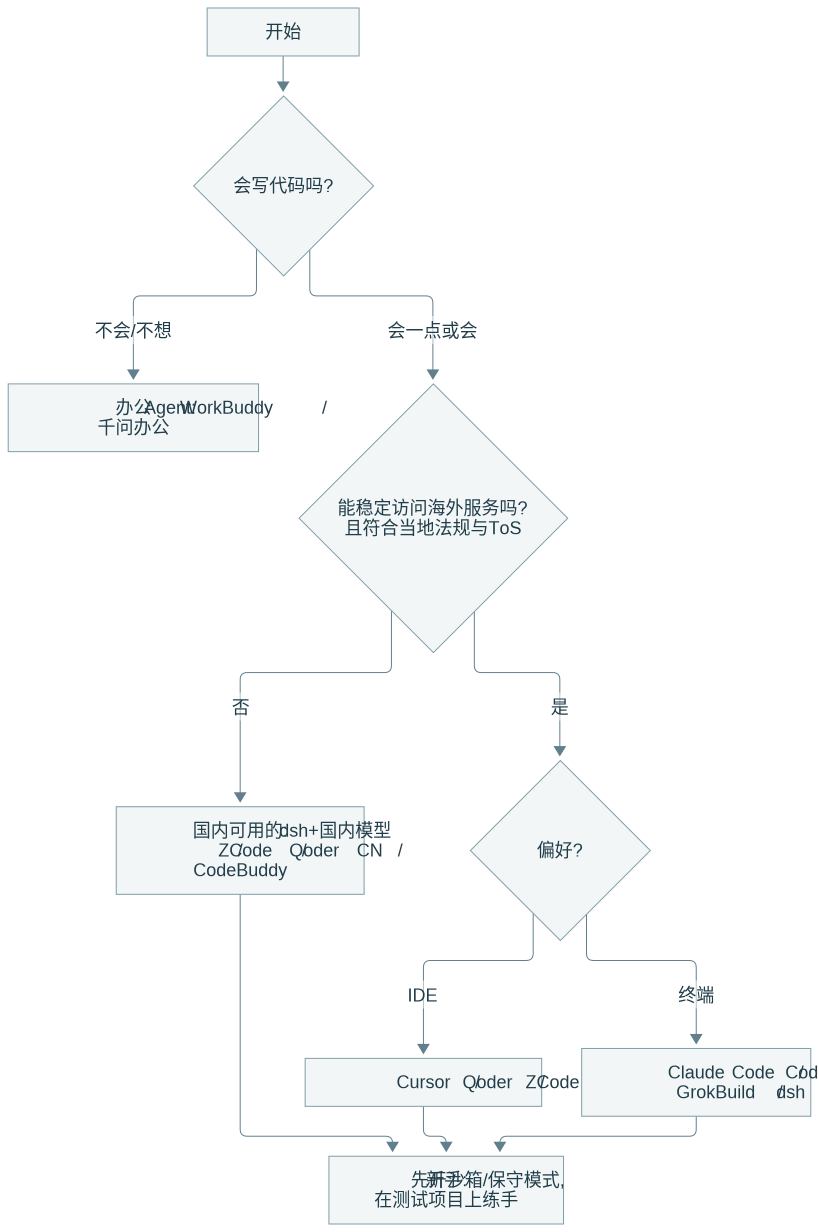
| Comfortable with an IDE and want to inspect and edit side by side | Desktop IDE tools such as Cursor, Qoder, or ZCode |
| Prefer the terminal and need scripting or CI integration | Claude Code, Codex CLI, Grok Build, or dsh headless |
| Not writing code—just looking for office automation | Office-oriented agents such as WorkBuddy or Qwen Work |
| Want a 24/7 personal assistant connected to chat apps | Self-hosted gateway tools (such as OpenClaw)—carry the highest security risk and must be isolated |
Author's perspective: For beginners, sandboxing (putting the AI in a bounded room first) is often friendlier than permission pop-ups (having the AI ask you before every single step). See Section 3 for the reasoning. This is an editorial perspective, not an absolute rule.
1. Anatomy and Mechanics of a Coding Agent
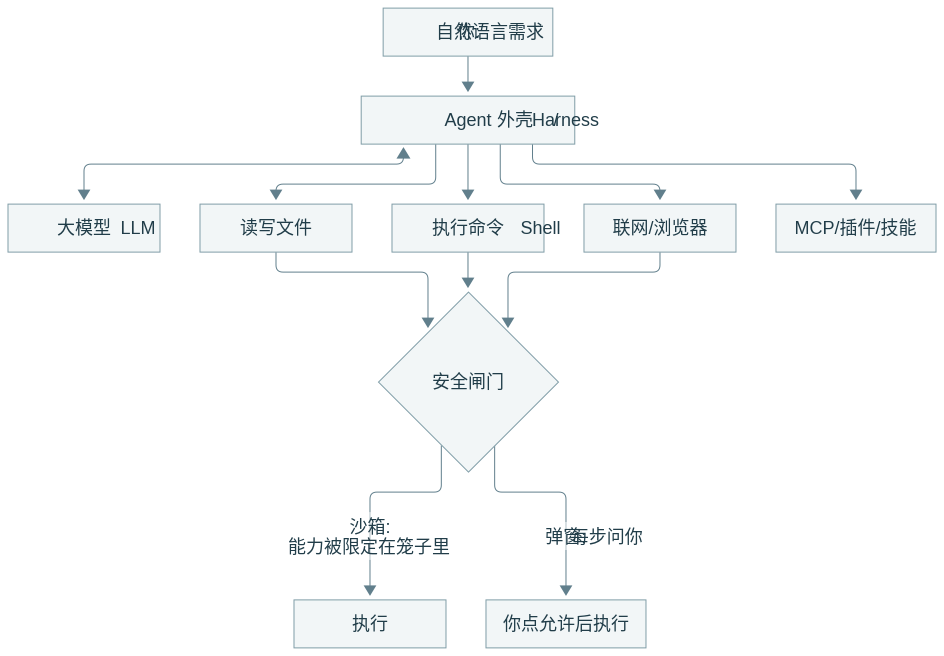
- The Model does the thinking, while the Harness (shell) does the acting: reading files, running commands, and invoking tools.
- Placing the exact same model inside different harnesses can produce very different practical experiences—which is why comparing the harnesses matters. [Community Consensus]
- Safety gates are a central focus of this guide: the two mainstream approaches are sandboxing and permission prompts (pop-ups). Many tools combine both, differing mainly in which layer they emphasize by default.
2. Tool Profiles and Practical Fit
2.1 dsh (DeepSeek Harness)
- [Verified] DeepSeek's official open-source Agent Harness, invoked on the command line as
dshunder the MIT license and built on the Cordis plugin framework around an "everything is a plugin" architecture (models, tools, skills, sessions, sandboxes, storage, scheduling, and UI are all plugins). It is currently in developer preview, and its README explicitly notes that breaking changes should be expected.- Official repository: https://github.com/deepseek-ai/deepseek-harness
- Official overview page: https://www.deepseek.com/en/harness/
- Documentation site: https://deepseek-harness.github.io/deepseek-harness/
- [Verified] Launch command:
npx @deepseek-ai/dsh web(opens the Web UI athttp://127.0.0.1:3080by default); additional profiles includeheadless,sdk, andacp. Source: apps/cli README - [Verified] Offers Standard, Code, Minimal, and Creator modes; the official site marks "Agent teams, automated approval review, scheduled tasks, and voice input" as Experimental.
- Strengths: Open-source, modular and swappable, with a well-structured sandbox design (see Section 3).
- Trade-offs: Developer preview with frequent changes; "everything is a plugin" means beginners need to understand profiles and plugins, which can make the initial learning curve steeper. [Unverified / Speculative]
2.2 Codex (OpenAI)
- [Verified] OpenAI's coding agent, spanning CLI, IDE extensions, desktop app, and cloud tasks (Codex Web / Cloud). CLI sandbox modes include
read-only,workspace-write, anddanger-full-access, paired with approval policies such ason-requestandnever; underworkspace-write, network access is disabled by default.- Sources: Agent approvals & security, Config Reference
- Strengths: Clear two-layer combination of sandbox + approval policy; integrated with ChatGPT subscriptions (see Codex Cloud Tasks and ChatGPT: From Requirements to Code Review).
- Trade-offs: Higher account registration and payment barriers for users in certain regions. [Community Consensus]
2.3 Claude Code (Anthropic)
- [Verified] Terminal-first coding agent featuring two complementary mechanisms: permission rules (deciding whether an action is allowed, prompted, or denied) and sandboxing (enforcing OS-level filesystem and network boundaries on Bash commands, enabled via
/sandbox). Under default sandboxing, commands can only write to the working directory and temporary directories.- Sources: Sandboxing, Permissions
- Strengths: Broad community recognition for mature agent workflows and rich extensibility (Skills, MCP, Hooks). [Community Consensus]
- Trade-offs: Anthropic enforces strict regional availability (Supported Countries/Regions), resulting in elevated account suspension risks for users connecting from unsupported regions (Networking, Regions, and Web Hosting Basics: IPs, Accounts, and Servers). [Verified + Community Consensus]
2.4 ZCode (Zhipu Z.ai)
- [Verified] Desktop "Agentic Development Environment (ADE)" from Zhipu optimized around GLM-5.3 with its own ZCode Agent. Source: ZCode Docs
- [Verified] Four execution modes: Ask before changes (default, prompting before every file edit or command), Edit automatically (edits files automatically while still prompting for commands), Plan (produces a plan first), and Full access (fewer prompts); pop-up choices include Allow, Always Allow, Reject, and Always Reject. Source: Safety Confirmation
- [Verified] Includes a
/goalmode that drives multi-turn execution automatically until verification passes or the budget is reached. Source: Goal Mode - Strengths: Pop-up prompts display the exact pending command or diff right in front of you for transparency.
- Trade-offs: Beginners who cannot interpret shell commands may click "Allow" without recognizing risky operations, making protection heavily dependent on user judgment (see Section 3). [Unverified / Speculative]
2.5 Cursor
- [Verified] VS Code-based AI IDE with Agent mode, auto-run terminal settings, Rules, and MCP support. Documentation: https://docs.cursor.com/
- Strengths: Polished IDE experience, visual diff review, and broad model selection. [Community Consensus]
- Trade-offs: Subscription and usage-based billing rules have changed multiple times; always check the official pricing page. [Community Consensus, subject to official terms]
- [Unverified / Speculative] Platform-specific terminal sandbox support and defaults in Cursor change across releases and are not audited item-by-item here; consult its latest documentation.
2.6 Grok Build (xAI)
- [Verified] xAI's terminal coding agent supporting TUI, headless (scripting/CI), and ACP (IDE integration), along with AGENTS.md, plugins, Hooks, MCP, subagents, and git worktrees; supports custom models via
~/.grok/config.toml. Includes an--always-approveflag (auto-approving all tool calls) and lists "Sandboxed execution" on its official page.- Sources: x.ai/build, Docs Overview, GitHub README
- [Verified] Installation:
curl -fsSL https://x.ai/cli/install.sh | bashornpm install -g @xai-official/grok. Source: Enterprise - Note: Branding and model version numbers (such as Grok 4.6 vs. 4.7) vary across pages on the official website, reflecting rapid updates; check the official documentation for current details. [Verified (observed on official pages)]
2.7 WorkBuddy (Tencent)
- [Verified] Tencent's desktop AI office workbench designed for general workplace roles: accepts natural-language tasks, breaks them down autonomously, invokes tools, reads and writes authorized local folders, and produces documents, spreadsheets, slides, and analytical reports. Enterprise editions support shared VPC, dedicated VPC, and on-premises deployment.
- [Verified] Tencent's dedicated coding product in the same family is CodeBuddy (available as plugin, IDE, and CLI), whereas WorkBuddy targets office workflows. Source: WorkBuddy Enterprise Overview
- Positioning note: Strictly speaking, WorkBuddy is not a pure coding agent; it is included here as a representative example of agents built for non-programmers.
2.8 Personal Assistant Gateways (OpenClaw and Similar Tools)
- [Verified] OpenClaw (nicknamed "Lobster" in Chinese developer communities) is an open-source, self-hosted AI assistant and agent gateway that can be controlled via messaging apps such as Telegram, Discord, and WhatsApp to read/write files, execute shell commands, and browse the web. Official site: https://openclaw.ai/, Docs: https://docs.openclaw.ai/zh-CN
- [Verified] Chinese media reported that CNCERT issued risk advisories regarding multiple vulnerabilities in OpenClaw (Tencent News, 2026-03); the documentation includes an
openclaw security auditcommand. - [Unverified / Speculative] The community term "Lobster-class tools" loosely refers to OpenClaw and various forks or similar gateways with ill-defined boundaries; unverified forks are omitted here.
- Security warning: Because these tools run persistently in the background and execute actions triggered by incoming chat messages, running one is effectively like letting someone remotely operate your computer through a chat window. Always run them inside an isolated environment (VM, dedicated machine, or container) with tightly restricted permissions. [Community Consensus]
2.9 Qoder (Alibaba)
- [Verified] Alibaba's agentic coding platform offering Qoder IDE, CLI, JetBrains integration, and a Quest mode for delegating long-horizon tasks (single-agent or multi-agent "Experts"). Sources: https://qoder.com/en, Docs
- [Verified] Also provides a Mainland China edition (Qoder CN): docs.qoder.cn
- Strengths: Likely offers smoother direct network connectivity for users inside Mainland China via its CN edition. [Unverified / Speculative]
2.10 Qwen Work (Alibaba Tongyi)
- [Verified] AI office agent platform from Alibaba Tongyi capable of working with files, skills, connectors, and scheduled tasks to deliver Word, Excel, PPT, PDF, web pages, and code artifacts; the web portal supports DingTalk QR login or Mainland China mobile phone login.
- Belongs to the same office-agent category as WorkBuddy.
3. Comparing Safety Mechanisms: DSH Sandbox vs. ZCode Permission Prompts
3.1 How the Two Mechanisms Operate
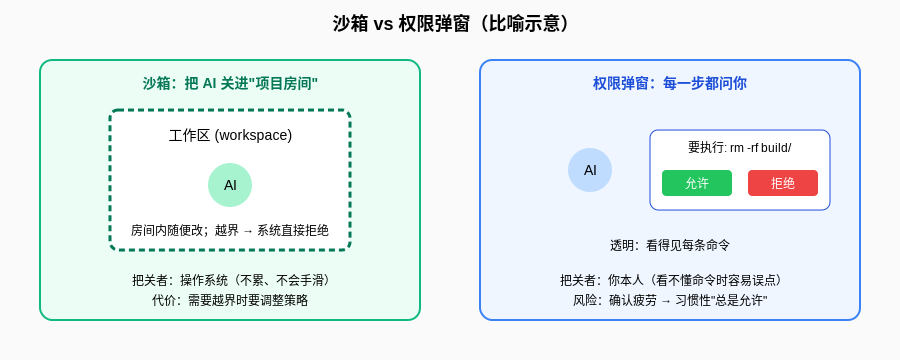
| Sandbox (dsh default philosophy) | Permission Prompts (ZCode default philosophy) | |
|---|---|---|
| Analogy | Placing an intern inside a locked room that contains only project files | Letting the intern walk around the entire building, but requiring a phone call to you before opening every door |
| Who enforces the boundary | Operating system mechanisms (automatic, tireless) | You personally (requires technical judgment, prone to fatigue) |
| When a mistake happens | Out-of-bounds actions fail immediately (fail-closed) | Clicking "Allow" by mistake executes the command for real |
| Interruption level | Low (free to operate inside the bounded room) | High (frequent prompts encourage habitual clicking) |
| Flexibility | Requiring out-of-bounds access means adjusting policy | Fine-grained decision on every single action |
3.2 What the DSH Sandbox Actually Restricts [Verified]
Sources: Process Sandbox Docs, Plugin Config Catalog, dsh-sandbox Plugin Docs
- Three modes:
read-only/workspace-write(writes restricted to workspace) /danger-full-access(unrestricted). These three modes only govern file effects. - Plugin default: The default
modeofdsh-sandbox-policyisread-only, described in the docs as a "fail-safe default"; however, combined profile configs, permission presets, and saved session states can override it, so do not assume every new session starts in read-only mode. - Implementation: Uses
bwrapor Landlock on Linux, Seatbelt (sandbox-exec) on macOS, restricted ACL tokens on Windows, plus an SSH remote backend. - Fail-closed: If no sandbox backend is available, it raises
SANDBOX_UNAVAILABLE; documentation explicitly states that silent fallback to unrestricted execution is not permitted. - Boundary: It is a "same-world" restriction—sharing the filesystem namespace and kernel with the host rather than acting as a full container or virtual machine.
3.3 How ZCode Permission Confirmation Works [Verified]
Source: ZCode Safety Confirmation
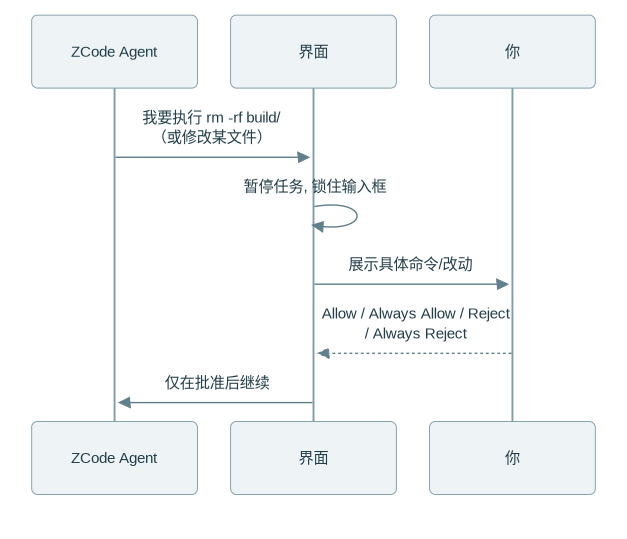
- Default mode "Ask before changes": requires confirmation before modifying any file or executing any shell command.
- When elevated or fully automatic mode is active, the toolbar continuously displays a visible risk status indicator.
3.4 Why Sandboxing May Suit Beginners Better
The points below reflect the author's perspective ([Unverified / Speculative]) and are open to debate.
- Beginners often cannot parse shell commands. Showing
chmod -R 777 ~in a dialog box does not help if the user does not recognize why that command is dangerous. Pop-up safety is only as strong as the user's technical judgment. - Approval fatigue: After dozens of prompts, users habitually click "Always Allow", effectively disabling protection. [Community Consensus: widely known in security engineering as consent or approval fatigue]
- Sandbox defaults enforce boundaries automatically: When a sandbox is set to read-only or workspace-only, out-of-bounds writes fail automatically without relying on user expertise.
- However, sandboxes are not a silver bullet:
- The dsh sandbox primarily restricts file modifications; network exfiltration or credential exposure require additional safeguards. [Verified: docs note that
modeapplies specifically to file effects] - Sandbox permission denials can confuse beginners when a command fails, requiring them to read error messages.
- Many mature tools combine both layers (Codex and Claude Code both pair sandboxing with approval rules), which is the recommended practice.
- The dsh sandbox primarily restricts file modifications; network exfiltration or credential exposure require additional safeguards. [Verified: docs note that
Safety Model Positioning (Illustrative Conceptual Matrix, Not Benchmark Data)
| Low Interruption | High Interruption | |
|---|---|---|
| OS-Enforced (Sandbox) | 🟢 Sweet spot: dsh read-only sandbox; Codex sandbox + approvals | 🟡 Safe but noisy |
| User-Judged (Pop-ups) | 🔴 Highest risk: Full-auto / YOLO modes across tools | 🟠 Human-gated: ZCode default ask mode and pure pop-up workflows |

The table and diagram above illustrate a subjective ranking of beginner-friendliness, not empirical benchmark measurements.
4. Comparative Summary Table
| Tool | Vendor | Form Factor | Primary Safety Mechanism | Best Fit For | Evidence Tier |
|---|---|---|---|---|---|
| dsh | DeepSeek | Web UI / CLI / SDK / ACP (see official site for desktop) | Sandbox (plugin default read-only) + approvals | Tinkerers who value strict safety defaults | Verified |
| Codex | OpenAI | CLI / IDE / Desktop / Cloud | Sandbox + approval policy | ChatGPT subscribers | Verified |
| Claude Code | Anthropic | CLI / IDE | Permission rules + optional sandbox | Power developers | Verified |
| ZCode | Zhipu (Z.ai) | Desktop ADE | 4 execution modes + confirmation pop-ups | Users who prefer visual approval gates | Verified |
| Cursor | Anysphere | IDE | Auto-run settings / allowlists | IDE-centric developers | Partially unverified |
| Grok Build | xAI | CLI / TUI / ACP | Approvals (with --always-approve) + sandboxed execution |
Terminal-focused developers | Verified |
| WorkBuddy | Tencent | Desktop Office Agent | Authorized local folders | Non-programmers | Verified |
| OpenClaw & similar | Open-source community | Self-hosted gateway | Requires manual hardening | Advanced self-hosters | Verified + High risk |
| Qoder | Alibaba | IDE / CLI / JetBrains | See official documentation | Developers in China / regional networks | Partially unverified |
| Qwen Work | Alibaba Tongyi | Web / DingTalk | Platform-hosted | Office productivity users | Verified |
Because pricing tiers, free quotas, and supported model lists change rapidly across vendors, this table deliberately omits pricing.
5. Tool Selection Flowchart
6. Items Pending Verification and Usage Notes
- Exact sandbox defaults and per-OS enforcement details for Cursor and Qoder have not been verified item by item.
- Scope of "Lobster-class" tools: projects beyond OpenClaw have not been independently audited here.
- All "Best Fit For" notes represent subjective editorial guidance.
- There is no universal answer to "which agent is strongest"—use the outcome-driven testing method described in AI Subscriptions and Model Evaluation: Billing, Payments, and Capability Testing.
Hands-On Practice: Step-by-Step Verification
Practice goal: Select a tool that fits your current task and computer environment.
Now that we have covered core concepts, configurations, and examples, walk through the sequence, checkpoints, and verification steps below for your first real trial. Run commands one at a time and check each output before proceeding.
-
Write down one concrete task you want to finish today—such as updating a button on a web page or summarizing three meeting notes. Evaluate coding tasks and office tasks separately.
-
Open the official documentation for your candidate tool, confirm that an installation method exists for your operating system, and note its sign-in method and billing channel.
-
Create a dedicated practice folder containing only sample files. Ask the candidate tool to list the files and summarize their contents first, watching whether it prompts for permissions.
-
Ask for a small, easily verifiable change—such as changing the title of a sample HTML page to a specific string. Observe the permission prompt and inspect the modified file afterward.
-
Run the exact same starting files through a second candidate tool, recording completion quality, time taken, cost, and how many manual interventions were required. Base your choice on your own test results rather than subjective ratings.
Default Permissions vs. Active Session Settings
[Verified] The official DSH permission presets documentation currently lists workspace-write + ask and danger-full-access + never. When defaultPreset is unset, effective permissions are derived from the combined sandbox and approval defaults, and existing sessions may retain their own saved settings. The existence of a preset in documentation does not guarantee every new session starts with it.
[Operational note] On first use, open the active session's Permissions view to verify the sandbox mode, approval policy, and workspace path. When practicing in read-only mode, confirm that the enforced file policy is actually set to read-only; simply writing "do not modify files" in a prompt does not enforce a system-level restriction.
[Verified] OpenAI's Codex documentation notes that startup permission suggestions also depend on whether the directory is version-controlled, trusted, and how the client is configured. Use /permissions and /status to verify live settings rather than assuming recommended combinations from an article are already active on your machine.
Reference sources: DeepSeek Official: Sandbox Policy Plugin README; DeepSeek Official: Permission Presets; OpenAI Official: Agent approvals & security.