Evidence tiers: [Verified] = backed by official documentation or credible source links; [Community Consensus] = shared user experience across the community, not officially confirmed; [Unverified / Speculative] = inferred or not yet verified—treat with caution.
🛡️ This Guide Focuses Strictly on Protecting Your Own Legitimate Accounts: preventing account takeover, stopping credential leaks, and handling appeals if an account is mistakenly flagged. It does not cover methods for evading platform risk controls (such as spoofing regions, anti-detect browser fingerprinting, or operating multi-account farms)—practices that often violate platform terms and fall outside the scope of this publication.
1. Security Risks and Protection Priorities for AI Accounts
| Risk | Consequence |
|---|---|
| API Key leak | Unauthorized third parties burn through your quota, leaving you responsible for the bill |
| Subscription account takeover | Your full conversation history (which may contain personal data or internal company material) is exposed |
Stolen Agent credentials (e.g., auth.json) |
An attacker can act under your identity to access code repositories and cloud services |
| Account suspension | Conversation history, project state, and remaining prepaid balances may all be lost at once |
2. Baseline Account Security Checklist [Verified / Community Consensus]
- ☐ Enable Two-Factor Authentication (2FA/MFA), preferring an authenticator app or Passkey over SMS verification [Community Consensus]
- ☐ Use a unique, strong password for every platform, managed through a password manager
- ☐ Bind an email address and phone number that you personally own and can access long-term
- ☐ Periodically review "Active Devices / Sessions" and revoke any unfamiliar entries
- ☐ Never sign in on public or shared computers; always sign out when finished
- ☐ Secure your upstream SSO identity providers (Google, GitHub, Apple) with strong 2FA as well
3. API Key Hygiene [Verified (Universal Vendor Guidance) + Community Consensus]
| Practice | Rationale |
|---|---|
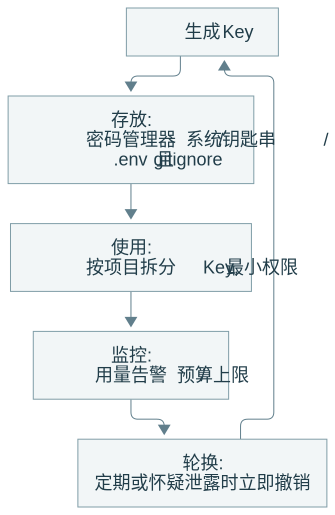
| Never hardcode API Keys in source code or commit them to Git | Platforms like GitHub run Secret Scanning, but by the time a scanner alerts you, automated bots may have already scraped the key |
| Issue a separate Key per project or tool | If one key leaks, you only need to rotate that single key without breaking other workflows |
| Configure hard spending caps and usage alerts | Bounds your maximum financial exposure if a key is compromised |
| Keep raw Keys out of the Agent's subprocess environment | Use mechanisms like Codex's shell_environment_policy (see Using Codex Locally: Installation, Permissions, Project Rules, and Troubleshooting) or dsh's credential store (see DSH Daily Workflows, Profiles, and Advanced Usage) |
| Inspect screenshots, screen recordings, and logs before sharing | API Keys frequently leak accidentally inside terminal screenshots |
What to Do If a Key Leaks: ① Revoke the compromised key immediately in the provider's official console → ② Generate a replacement key and update your local configuration → ③ Audit usage logs for unauthorized calls → ④ Contact official support if you spot fraudulent charges.
4. Emerging Risks in the Agent Era [Community Consensus]
| Risk | Scenario | Mitigation |
|---|---|---|
| Prompt injection | An Agent reads malicious instructions hidden inside a webpage, email, or GitHub Issue and executes destructive commands | Use sandboxing and approval modes (AI Coding Agent Selection Guide: Tools, Permissions, and Workflows, Using Codex Locally: Installation, Permissions, Project Rules, and Troubleshooting, Using Claude Code: Installation, Permissions, and Project Workflows, Using ZCode: Model Connections, Execution Modes, and Goal Tasks, Using Cursor: Project Rules, Execution Modes, and Bring Your Own Key, Using Grok Build: Installation, Permissions, Sandbox, and Goal Tasks, Using WorkBuddy: Workspaces, Document Tasks, and Model Settings, Getting Started with OpenClaw: Isolated Environments, Configuration, and Security Boundaries, Using Qoder: IDE, CLI, Permissions, and Custom Models) |
| Centralized credential files | Third-party account managers aggregate tokens from all platforms into a single folder (see Cockpit Tools: Credential Storage, Feature Boundaries, and Terms-of-Service Assessment) | Avoid or minimize use of such tools; enable full-disk encryption |
| Malicious plugins / MCP servers / Skills | Unverified extensions read local files or exfiltrate secrets | Install only from trusted sources and review requested permissions |
| Unintended actions in autonomous modes | YOLO or bypass modes accidentally delete files or force-push code | Run high-autonomy modes strictly inside isolated containers or VMs |
5. Understanding Platform Risk Controls Through Compliance
[Community Consensus] Platform anti-abuse systems primarily look for account takeovers, payment fraud, platform abuse (bulk sign-ups, automated scraping, unauthorized reselling), policy-violating content, and access from unsupported jurisdictions. The most reliable way for an ordinary user to avoid false-positive flags is to maintain a clear, consistent, and authentic account profile:
| Compliant Practice | Why It Matters |
|---|---|
| Register from an officially supported region using accurate personal details | Regional mismatches can violate terms of service directly (Networking, Regions, and Web Hosting Basics: IPs, Accounts, and Servers highlights this risk for services like Claude) |
| Pay with a payment method in your own name | Third-party proxy payments, virtual cards of questionable origin, or gray-market gift cards frequently trigger payment-fraud blocks |
| Never share, buy, or sell accounts | Explicitly prohibited by virtually all provider terms |
| Avoid account-rotation and quota-wakeup tools | See Cockpit Tools: Credential Storage, Feature Boundaries, and Terms-of-Service Assessment |
| Use consumer subscriptions through official first-party clients | See Using magpie: Provider Configuration, Model Switching, and Config Recovery |
6. Handling Account Suspensions or Restrictions
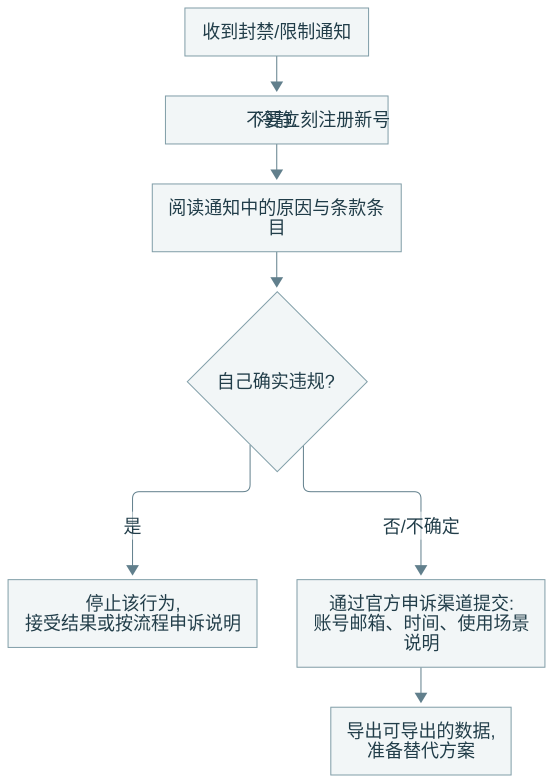
[Community Consensus] Immediately registering a new account to evade a suspension is treated by most platforms as a more severe violation that often leads to immediate chain bans.
To submit an appeal, search for "appeal" in the respective vendor's official Help Center (exact form URLs change periodically and are not hardcoded here).
7. Items Pending Verification & Usage Notes
- Exact internal triggers for platform anti-abuse engines: these are proprietary and never publicly disclosed—treat any rumoured "insider rules" with skepticism.
- Appeal success rates: no verified public statistics exist.
- Each platform's exact tolerance regarding one person holding separate personal and work accounts: always refer to the vendor's published Terms of Service.
Hands-On Practice: Step-by-Step Verification
Exercise goal: Protect web login sessions, API Keys, and third-party authorizations independently.
The sections above cover concepts, configuration, and operational examples. The steps below focus on the execution sequence, checkpoints, and verification for your first hands-on run; refer back to the relevant sections whenever you need specific parameters. Enter commands one at a time and verify each result before proceeding.
-
Open your account security settings, confirm that your bound email address can still receive messages, and enable an authenticator app or Passkey for two-factor authentication.
-
Store your 2FA recovery codes in an independent, durable location—do not leave them solely on the same device that could be lost or damaged.
-
Review active signed-in devices and third-party OAuth authorizations one by one; revoke any unfamiliar or no-longer-used sessions and connectors.
-
Create a dedicated API Key for each project and inspect available permission scopes, usage alerts, and hard spend caps. Remember that an email alert is not the same as a hard billing cutoff.
-
If a credential leaks, revoke it in the console first, replace it in your local config second, and audit usage logs and recent actions third. Simply changing your account password does not necessarily invalidate existing API tokens.
-
If your account is restricted, save the official notice, timestamps, and relevant operational context, and submit an appeal through the official Help Center rather than relying on unverified rumours about internal risk rules.