二稿核驗說明(2026-10-15):本文為“河洛序”教程二稿,已按官方規範與文檔修訂。舊實驗日誌單獨標為“一稿留存輸出”,不代表本次在Windows上的復跑;本次環境與結果見本批核驗記錄。示例中的“星河筆記”、賬號、訂單、價格與政策均為虛構教學數據。
一句話定義
CSS用選擇器和聲明指定頁面表現。多個聲明競爭時,瀏覽器依照層疊規則,綜合適用性、來源與重要性、層、內聯樣式、優先級及後續順序等因素決定結果;specificity不是整個算法。
為什麼重要
- “我寫的樣式為什麼不生效”幾乎都是層疊問題;理解優先級才能有效排錯,而不是到處加
!important。 - 盒模型與 Flex/Grid 佈局決定了頁面在不同螢幕上的表現。
- AI 生成的前端程式碼樣式衝突很常見,讀懂層疊才能審得動。
原理 / 圖解
CSS Cascading and Inheritance Level 5:https://www.w3.org/TR/css-cascade-5/;Selectors Level 4 優先級計算:https://www.w3.org/TR/selectors-4/#specificity-rules;MDN 優先級:https://developer.mozilla.org/zh-CN/docs/Web/CSS/Specificity
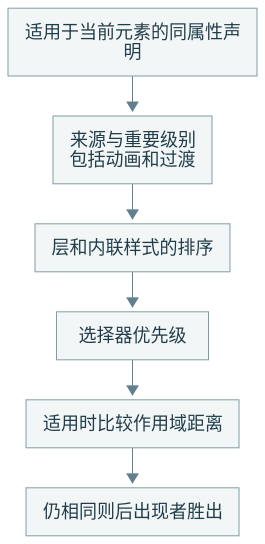
(簡化版:完整規則還包括樣式來源(用戶代理/用戶/作者)、@layer 層與作用域等。)
| 概念 | 要點 |
|---|---|
| 優先級 | (id, class/屬性/偽類, 元素/偽元素) 三元組按位比較;#buy (1,0,0) 勝過任意多個 class |
| 繼承 | color、font-size 等文字屬性預設繼承;border、width、padding 不繼承 |
| 盒模型 | content-box:width 只算內容;border-box:width 含 padding 與 border |
| Flexbox | 一維佈局;flex: 1 與 flex: 2 按比例分配剩餘空間 |
適用邊界與核驗要點
正文的小型比較器僅適用於同一作者來源、有限選擇器且沒有層、動畫、過渡和複雜作用域的演示。!important不是無條件最高,來源與層在重要聲明中也有順序,過渡中的值另有優先規則。Flex按增長因子分配的是可分配空間,實際尺寸還受basis、最小內容、padding和gap影響。jsdom不實現完整佈局,某一舊版本的顏色結果不能推廣成所有版本都如此。
本次檢索核對的主要依據(2026-10-15):
- W3C:CSS Cascade Level5:來源、重要性、層與優先級順序。
- MDN:層疊介紹:層疊完整因素及重要聲明順序。
可運行示例
Python僅預測本例有限選擇器,再與本機Chrome或Edge的計算結果和jsdom對照。設定BROWSER_BIN可指定瀏覽器,保持其原有sandbox。下方舊日誌不代表本次瀏覽器版本。
檔案:examples/web/css_demo.html
<!DOCTYPE html>
<html><head><meta charset="utf-8"><style>
  /* 層疊:同一個按鈕被 5 條規則同時命中 */
  button            { color: green; }
  .btn              { color: orange; }
  .btn.primary      { color: blue; }
  #buy              { color: red; }
  .card button      { color: purple; }
  .note             { color: gray !important; }
  /* 盒模型 */
  .a { width: 200px; padding: 20px; border: 5px solid; box-sizing: content-box; }
  .b { width: 200px; padding: 20px; border: 5px solid; box-sizing: border-box; }
  /* Flex 佈局 */
  .row { display: flex; width: 600px; gap: 0; }
  .side { flex: 1; } .content { flex: 2; }
  /* 繼承 */
  .card { font-size: 20px; border: 1px solid; }
</style></head>
<body>
  <div class="card">
    <button id="buy" class="btn primary">購買</button>
    <button id="buy2" class="btn primary note" style="color: black">購買2</button>
    <span id="child">我繼承了 font-size,但不繼承 border</span>
  </div>
  <div class="a" id="boxA">A</div><div class="b" id="boxB">B</div>
  <div class="row"><div class="side" id="side">側欄</div><div class="content" id="content">正文</div></div>
  <pre id="out"></pre>
  <script>
    const q = s => document.querySelector(s), cs = s => getComputedStyle(q(s));
    const w = s => q(s).getBoundingClientRect().width;
    q("#out").textContent = JSON.stringify({
      buy: cs("#buy").color, buy2: cs("#buy2").color,
      child_font: cs("#child").fontSize, child_border: cs("#child").borderTopWidth,
      boxA: w("#boxA"), boxB: w("#boxB"), side: w("#side"), content: w("#content")
    });
  </script>
</body></html>
# 檔案:examples/16_css.py
"""CSS 層疊與優先級:用 Python 計算選擇器優先級並預測勝出規則,再交給真實瀏覽器(Chrome 無頭模式)和 jsdom 計算,對比結果。"""
import re, json, subprocess, tempfile, pathlib, html as H, os, shutil
RULES = [("button", "green", False), (".btn", "orange", False), (".btn.primary", "blue", False),
         ("#buy", "red", False), (".card button", "purple", False), (".note", "gray", True)]
def specificity(sel):
    ids = len(re.findall(r"#[\w-]+", sel)); cls = len(re.findall(r"\.[\w-]+|\[[^\]]+\]|:(?!:)[\w-]+", sel))
    tags = len([t for t in re.split(r"[\s>+~]+", re.sub(r"[#.][\w-]+", " ", sel)) if t.strip()])
    return (ids, cls, tags)
print("① 選擇器優先級 (id, class, 元素):")
for s, c, imp in RULES: print(f"   {s:<14} {specificity(s)}  color:{c}{' !important' if imp else ''}")
def winner(el_classes, el_id, inline=None):
    cand = []
    for order, (s, c, imp) in enumerate(RULES):
        parts = s.split()[-1]
        need_id = re.findall(r"#([\w-]+)", parts); need_cls = re.findall(r"\.([\w-]+)", parts); tag = re.match(r"^[a-z]+", parts)
        if (not need_id or need_id[0] == el_id) and set(need_cls) <= el_classes and (not tag or tag.group() == "button"):
            cand.append(((imp, 0, specificity(s), order), c, s))     # 先比 !important,再比內聯,再比優先級,最後比出現順序
    if inline: cand.append(((False, 1, (0, 0, 0), 99), inline, "style=\"…\"(內聯)"))
    return max(cand)
for el, cls, idd, inline in [("#buy", {"btn", "primary"}, "buy", None), ("#buy2", {"btn", "primary", "note"}, "buy2", "black")]:
    k, c, s = winner(cls, idd, inline); print(f"② Python 預測 {el}: 勝出規則 {s} → {c}")

web = pathlib.Path(__file__).resolve().parent / "web"
page = web / "css_demo.html"
browser = os.environ.get("BROWSER_BIN") or shutil.which("google-chrome") or shutil.which("msedge")
if not browser:
    edge = pathlib.Path(r"C:\Program Files (x86)\Microsoft\Edge\Application\msedge.exe")
    browser = str(edge) if edge.is_file() else None
if not browser: raise RuntimeError("設定 BROWSER_BIN 為已安裝的 Chrome/Edge 可執行檔")
with tempfile.TemporaryDirectory() as prof:
    result = subprocess.run([browser, "--headless=new", "--disable-gpu", "--no-first-run", f"--user-data-dir={prof}",
                            "--window-size=1200,800", "--dump-dom", page.as_uri()], capture_output=True, text=True,
                            encoding="utf-8", errors="replace", timeout=60,
                            creationflags=subprocess.CREATE_NO_WINDOW if os.name == "nt" else 0)
    if result.returncode:
        raise RuntimeError(f"瀏覽器退出碼 {result.returncode}:{result.stderr[-2500:]}")
    dom = result.stdout
match = re.search(r'<pre id="out">(.*?)</pre>', dom, re.S)
if not match: raise RuntimeError("瀏覽器未返回預期頁面,請檢查 BROWSER_BIN 與本地瀏覽器啟動日誌")
chrome = json.loads(H.unescape(match.group(1)))
assert chrome["buy"] == "rgb(255, 0, 0)" and chrome["buy2"] == "rgb(128, 128, 128)", chrome
assert chrome["boxA"] == 250 and chrome["boxB"] == 200, chrome
ver = pathlib.Path(browser).name
js = """const {JSDOM}=require('jsdom');const fs=require('fs');const d=new JSDOM(fs.readFileSync('css_demo.html','utf8')).window;
const c=s=>d.getComputedStyle(d.document.querySelector(s));console.log(JSON.stringify({buy:c('#buy').color,buy2:c('#buy2').color,child_font:c('#child').fontSize}))"""
jsd = json.loads(subprocess.run(["node", "-e", js], cwd=web, capture_output=True, text=True, encoding="utf-8", check=True).stdout)
print(f"\n③ {ver} 實際計算結果:")
for k, v in chrome.items(): print(f"   {k:<13} {v}")
print("④ jsdom 24 計算結果(無佈局引擎,寬度無法計算):", jsd)
一稿留存輸出
以下日誌按一稿保留,來自一稿聲稱的原環境;不是本次復跑結果。二稿程式碼改動後可產生不同輸出,實際復跑狀態以本批核驗記錄為準。
① 選擇器優先級 (id, class, 元素):
   button         (0, 0, 1)  color:green
   .btn           (0, 1, 0)  color:orange
   .btn.primary   (0, 2, 0)  color:blue
   #buy           (1, 0, 0)  color:red
   .card button   (0, 1, 1)  color:purple
   .note          (0, 1, 0)  color:gray !important
② Python 預測 #buy: 勝出規則 #buy → red
② Python 預測 #buy2: 勝出規則 .note → gray

③ Google Chrome 154.0.8037.97 實際計算結果:
   buy           rgb(255, 0, 0)
   buy2          rgb(128, 128, 128)
   child_font    20px
   child_border  0px
   boxA          250
   boxB          200
   side          200
   content       400
④ jsdom 24 計算結果(無佈局引擎,寬度無法計算): {'buy': 'rgb(128, 0, 128)', 'buy2': 'rgb(0, 0, 0)', 'child_font': ''}
- ① ② 按鈕
#buy被 5 條規則命中,#buy的優先級 (1,0,0) 最高,預測為紅色;#buy2有內聯color: black,但.note帶!important,預測為灰色。 - ③ Chrome 154 的計算結果與預測一致:
rgb(255, 0, 0)紅、rgb(128, 128, 128)灰。 - ③ 繼承:
<span>繼承了.card的font-size: 20px,但邊框寬度是0px——border 不繼承。 - ③ 盒模型:同樣
width: 200px,content-box實際寬 250(200 + 2×20 padding + 2×5 border),border-box實際寬 200。很多重置樣式(如 Tailwind 的 preflight)預設全局使用border-box正是為此https://tailwindcss.com/docs/preflight。 - ③ Flex:600px 容器按 1:2 分為 200 與 400。
- ④ 一稿實驗記錄:一稿所用jsdom得到不同的顏色和繼承結果,說明該次實現不能覆蓋本例的完整層疊要求。不能據此推斷其他版本會給出相同結果;佈局仍應由真實瀏覽器驗證。涉及樣式與佈局的測試應使用真實瀏覽器(Playwright、Puppeteer 或無頭 Chrome),jsdom 適合 DOM 結構與事件邏輯的測試。
- 說明:本例的 Python 預測器只處理了這幾個選擇器的最後一段,不是完整的選擇器匹配實現。
自測
問題: 兩個元素flex分別為1和2,是否在任何內容下寬度都恰好1:2?
參考答案: 不是。還要考慮flex-basis、min-width/min-content、邊距、間隙和可分配空間。本例條件簡化後得到200與400。
常見誤區
- “
!important能解決一切”:它只是把衝突升級到另一層,之後需要按來源、層、重要性及優先級處理,繼續堆疊important會增加維護成本,最終無法維護。 - “10 個 class 能勝過 1 個 id”:不能,優先級按位比較,不是十進制加和。
- “內聯樣式優先級最高”:會被作者樣式表裏的
!important覆蓋(見#buy2)。 - “用 jsdom 跑的樣式測試通過了就沒問題”:見 ④。
與 AI 開發的關係
- 讓 AI 生成前端時,約定一種樣式方案(如 Tailwind 原子類、CSS Modules)能顯著減少層疊衝突。
- 無頭瀏覽器渲染網頁後再提取正文/截圖,是 RAG 抓取動態網頁、多模態模型“看網頁”的常用方式;本例的
--dump-dom就是最簡單的形式。 - 檢查網頁中被 CSS 隱藏的文本(
display:none、font-size:0、顏色與背景相同),可以發現針對 AI 爬蟲的隱藏指令。
延伸閱讀
- MDN CSS 佈局教程:https://developer.mozilla.org/zh-CN/docs/Learn/CSS/CSS_layout
- CSS Tricks Flexbox 指南:https://css-tricks.com/snippets/css/a-guide-to-flexbox/
- jsdom 已知限制(無佈局):https://github.com/jsdom/jsdom#unimplemented-parts-of-the-web-platform
尚未驗證的範圍
- 有限選擇器預測器不實現完整CSS算法;當前瀏覽器復跑狀態見核驗記錄,舊jsdom差異不外推其他版本。
本次示例運行範圍
2026-10-15:透過。獨立臨時配置的Edge無頭佈局斷言及jsdom對照;預測器只覆蓋有限選擇器。
“一稿留存輸出”保留原字,不是二稿程式碼新生成的結果;其原結論須結合二稿修訂與邊界閱讀。
配套程式碼與核驗資料