Second-Draft Verification Note (2026-10-15): This article is the second draft of the HeLuoXu tutorial, revised against official specifications and documentation. Previous experiment logs are labeled separately as "First-Draft Archived Output" and do not represent a Windows re-run during this pass; see the batch verification record for current environment details and results. "StarRiver Notes", accounts, orders, prices, and policies in the examples are fictional teaching data.
One-Line Definition
CSS specifies document presentation using selectors and declarations. When multiple declarations compete, the browser resolves the winner through the cascade algorithm by weighing applicability, origin and importance, cascade layers, inline styles, specificity, and source order; specificity alone is not the entire algorithm.
Why It Matters
- Almost every "why isn't my CSS rule taking effect?" headache comes down to the cascade; understanding specificity and cascade order lets you debug cleanly instead of sprinkling
!importanteverywhere. - The box model and Flexbox/Grid layout systems govern how elements size and adapt across screen widths.
- AI-generated frontend code frequently introduces style collisions—reading the cascade is essential for reviewing and fixing generated stylesheets.
How It Works / Diagram
CSS Cascading and Inheritance Level 5: https://www.w3.org/TR/css-cascade-5/; Selectors Level 4 calculating specificity: https://www.w3.org/TR/selectors-4/#specificity-rules; MDN Specificity guide: https://developer.mozilla.org/zh-CN/docs/Web/CSS/Specificity
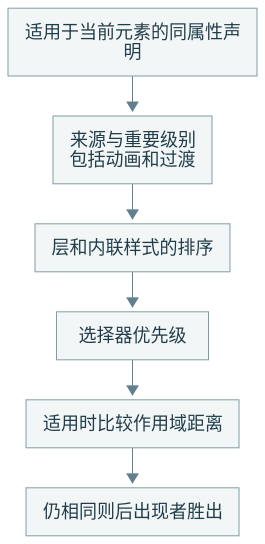
(Simplified view: the full cascade specification also accounts for style origin [user-agent / user / author], @layer cascade layers, and scoping.)
| Concept | Key Takeaway |
|---|---|
| Specificity | Compared lexicographically as a 3-tuple (id, class/attribute/pseudo-class, element/pseudo-element); #buy (1,0,0) beats any number of classes |
| Inheritance | Typography properties such as color and font-size inherit by default; box properties like border, width, and padding do not |
| Box model | content-box: width measures content only; border-box: width includes content, padding, and border |
| Flexbox | One-dimensional layout; flex: 1 and flex: 2 distribute available free space proportionally |
Scope Boundaries & Verification Points
The compact Python comparator in the example below applies only to same-origin author rules with simple selectors and no cascade layers (@layer), animations, transitions, or scoped styles. Moreover, !important is not unconditionally supreme: origins and cascade layers invert their precedence order for important declarations, and active CSS transitions/animations follow dedicated cascade steps. In Flexbox, flex-grow distributes remaining free space rather than always forcing exact final width ratios, since flex-basis, minimum content size, padding, and gap also affect geometry. Finally, jsdom does not implement a layout engine, and color resolution quirks from one historical jsdom release should not be generalized to every release.
Primary references verified in this pass (2026-10-15):
- W3C: CSS Cascading and Inheritance Level 5: precedence order of origins, importance, layers, and specificity.
- MDN: Introducing the CSS Cascade: full cascade factors and important declaration ordering.
Runnable Example
The Python script predicts the winning rule for this small selector set and compares the prediction against both a headless Chromium browser (Chrome or Edge) and jsdom. You can set BROWSER_BIN to point to your local browser binary while keeping its normal sandbox intact. The archived log below reflects the browser version from the first draft.
File: examples/web/css_demo.html
<!DOCTYPE html>
<html><head><meta charset="utf-8"><style>
  /* Cascade: the same button is matched by 5 rules simultaneously */
  button            { color: green; }
  .btn              { color: orange; }
  .btn.primary      { color: blue; }
  #buy              { color: red; }
  .card button      { color: purple; }
  .note             { color: gray !important; }
  /* Box model */
  .a { width: 200px; padding: 20px; border: 5px solid; box-sizing: content-box; }
  .b { width: 200px; padding: 20px; border: 5px solid; box-sizing: border-box; }
  /* Flex layout */
  .row { display: flex; width: 600px; gap: 0; }
  .side { flex: 1; } .content { flex: 2; }
  /* Inheritance */
  .card { font-size: 20px; border: 1px solid; }
</style></head>
<body>
  <div class="card">
    <button id="buy" class="btn primary">Buy</button>
    <button id="buy2" class="btn primary note" style="color: black">Buy 2</button>
    <span id="child">I inherit font-size, but not border</span>
  </div>
  <div class="a" id="boxA">A</div><div class="b" id="boxB">B</div>
  <div class="row"><div class="side" id="side">Sidebar</div><div class="content" id="content">Main Content</div></div>
  <pre id="out"></pre>
  <script>
    const q = s => document.querySelector(s), cs = s => getComputedStyle(q(s));
    const w = s => q(s).getBoundingClientRect().width;
    q("#out").textContent = JSON.stringify({
      buy: cs("#buy").color, buy2: cs("#buy2").color,
      child_font: cs("#child").fontSize, child_border: cs("#child").borderTopWidth,
      boxA: w("#boxA"), boxB: w("#boxB"), side: w("#side"), content: w("#content")
    });
  </script>
</body></html>
# File: examples/16_css.py
"""CSS cascade and specificity: compute selector specificity in Python to predict winning rules, then verify against headless Chrome/Edge and jsdom."""
import re, json, subprocess, tempfile, pathlib, html as H, os, shutil
RULES = [("button", "green", False), (".btn", "orange", False), (".btn.primary", "blue", False),
         ("#buy", "red", False), (".card button", "purple", False), (".note", "gray", True)]
def specificity(sel):
    ids = len(re.findall(r"#[\w-]+", sel)); cls = len(re.findall(r"\.[\w-]+|\[[^\]]+\]|:(?!:)[\w-]+", sel))
    tags = len([t for t in re.split(r"[\s>+~]+", re.sub(r"[#.][\w-]+", " ", sel)) if t.strip()])
    return (ids, cls, tags)
print("1. Selector specificity (id, class, element):")
for s, c, imp in RULES: print(f"   {s:<14} {specificity(s)}  color:{c}{' !important' if imp else ''}")
def winner(el_classes, el_id, inline=None):
    cand = []
    for order, (s, c, imp) in enumerate(RULES):
        parts = s.split()[-1]
        need_id = re.findall(r"#([\w-]+)", parts); need_cls = re.findall(r"\.([\w-]+)", parts); tag = re.match(r"^[a-z]+", parts)
        if (not need_id or need_id[0] == el_id) and set(need_cls) <= el_classes and (not tag or tag.group() == "button"):
            cand.append(((imp, 0, specificity(s), order), c, s))     # Compare !important -> inline -> specificity -> source order
    if inline: cand.append(((False, 1, (0, 0, 0), 99), inline, "style=\"...\"(inline)"))
    return max(cand)
for el, cls, idd, inline in [("#buy", {"btn", "primary"}, "buy", None), ("#buy2", {"btn", "primary", "note"}, "buy2", "black")]:
    k, c, s = winner(cls, idd, inline); print(f"2. Python prediction for {el}: winning rule {s} -> {c}")

web = pathlib.Path(__file__).resolve().parent / "web"
page = web / "css_demo.html"
browser = os.environ.get("BROWSER_BIN") or shutil.which("google-chrome") or shutil.which("msedge")
if not browser:
    edge = pathlib.Path(r"C:\Program Files (x86)\Microsoft\Edge\Application\msedge.exe")
    browser = str(edge) if edge.is_file() else None
if not browser: raise RuntimeError("Set BROWSER_BIN to an installed Chrome/Edge executable")
with tempfile.TemporaryDirectory() as prof:
    result = subprocess.run([browser, "--headless=new", "--disable-gpu", "--no-first-run", f"--user-data-dir={prof}",
                            "--window-size=1200,800", "--dump-dom", page.as_uri()], capture_output=True, text=True,
                            encoding="utf-8", errors="replace", timeout=60,
                            creationflags=subprocess.CREATE_NO_WINDOW if os.name == "nt" else 0)
    if result.returncode:
        raise RuntimeError(f"Browser exit code {result.returncode}: {result.stderr[-2500:]}")
    dom = result.stdout
match = re.search(r'<pre id="out">(.*?)</pre>', dom, re.S)
if not match: raise RuntimeError("Browser did not return expected DOM output; check BROWSER_BIN and startup logs")
chrome = json.loads(H.unescape(match.group(1)))
assert chrome["buy"] == "rgb(255, 0, 0)" and chrome["buy2"] == "rgb(128, 128, 128)", chrome
assert chrome["boxA"] == 250 and chrome["boxB"] == 200, chrome
ver = pathlib.Path(browser).name
js = """const {JSDOM}=require('jsdom');const fs=require('fs');const d=new JSDOM(fs.readFileSync('css_demo.html','utf8')).window;
const c=s=>d.getComputedStyle(d.document.querySelector(s));console.log(JSON.stringify({buy:c('#buy').color,buy2:c('#buy2').color,child_font:c('#child').fontSize}))"""
jsd = json.loads(subprocess.run(["node", "-e", js], cwd=web, capture_output=True, text=True, encoding="utf-8", check=True).stdout)
print(f"\n3. Actual computed values in {ver}:")
for k, v in chrome.items(): print(f"   {k:<13} {v}")
print("4. jsdom 24 computed values (no layout engine, widths cannot be computed):", jsd)
First-Draft Archived Output
The log below is preserved from the first draft's original environment and is not a re-run result from this pass. Refer to the batch verification link below for the current run log.
1. Selector specificity (id, class, element):
   button         (0, 0, 1)  color:green
   .btn           (0, 1, 0)  color:orange
   .btn.primary   (0, 2, 0)  color:blue
   #buy           (1, 0, 0)  color:red
   .card button   (0, 1, 1)  color:purple
   .note          (0, 1, 0)  color:gray !important
2. Python prediction for #buy: winning rule #buy -> red
2. Python prediction for #buy2: winning rule .note -> gray

3. Actual computed values in Google Chrome 154.0.8037.97:
   buy           rgb(255, 0, 0)
   buy2          rgb(128, 128, 128)
   child_font    20px
   child_border  0px
   boxA          250
   boxB          200
   side          200
   content       400
4. jsdom 24 computed values (no layout engine, widths cannot be computed): {'buy': 'rgb(128, 0, 128)', 'buy2': 'rgb(0, 0, 0)', 'child_font': ''}
- 1 & 2. Button
#buyis matched by 5 rules simultaneously;#buyhas the highest specificity(1,0,0), so Python predicts red. Button#buy2has an inlinecolor: black, but.notecarries!important, so Python predicts gray. - 3. Chrome 154's computed styles match the predictions:
rgb(255, 0, 0)(red) andrgb(128, 128, 128)(gray). - 3. Inheritance:
<span id="child">inheritsfont-size: 20pxfrom.card, whereas its top border width is0pxbecauseborderis not an inherited property. - 3. Box model: Both boxes specify
width: 200px, butcontent-boxrenders at 250 px total width (200 + 2×20 padding + 2×5 border) whileborder-boxrenders at 200 px total width. This is why CSS resets such as Tailwind's Preflight setbox-sizing: border-boxglobally by default (https://tailwindcss.com/docs/preflight). - 3. Flexbox: The 600 px container is split in a 1:2 ratio into 200 px and 400 px.
- 4. First-draft experiment record: The
jsdomversion tested in the first draft produced different computed colors and inheritance values, showing that its CSS parser/cascade implementation did not cover the full requirements of this example (do not assume everyjsdomversion behaves identically, and always verify layout in a real browser engine). Run style and layout assertions in a real browser (Playwright, Puppeteer, or headless Chromium); reservejsdomfor DOM tree and event-handler unit tests. - Note: The toy Python predictor above only inspects the final compound selector segment of these six rules and is not a general CSS selector matcher.
Self-Test
Question: If two flex items have flex: 1 and flex: 2, will their rendered widths always be in an exact 1:2 ratio regardless of their inner content?
Reference Answer: No. Rendered widths also depend on flex-basis, min-width / minimum content size, padding, borders, gaps, and how much free space remains to distribute. The example above yields 200 px and 400 px because both items have short text, zero basis, and zero padding/gap.
Common Pitfalls
- "
!importantsolves every styling conflict": It merely escalates the conflict to a higher priority tier where origin, cascade layers, and specificity still compete; stacking!importantrules makes stylesheets brittle and unmaintainable. - "Ten classes can outweigh one ID": False—specificity tuples are compared column by column, not added together in base 10.
- "Inline styles always have the highest priority": Inline styles are overridden by author stylesheet rules marked
!important(as demonstrated by#buy2). - "If my style test passes in
jsdom, the layout works": See item 4 above—jsdomhas no layout engine.
Relevance to AI Development
- When prompting an LLM to generate frontend components, standardizing on a single styling convention (such as Tailwind utility classes or CSS Modules) sharply reduces cascade collisions.
- Rendering pages in a headless browser before extracting text or screenshots is standard practice for RAG crawlers on dynamic sites and multimodal web agents;
--dump-domin the script above is the simplest form of headless rendering. - Auditing web pages for text hidden via CSS (
display: none,font-size: 0, or foreground color matching the background) helps detect indirect prompt injection aimed at AI web scrapers.
Further Reading
- MDN CSS Layout guide: https://developer.mozilla.org/zh-CN/docs/Learn/CSS/CSS_layout
- CSS-Tricks Complete Guide to Flexbox: https://css-tricks.com/snippets/css/a-guide-to-flexbox/
- jsdom unimplemented parts of the web platform (no layout): https://github.com/jsdom/jsdom#unimplemented-parts-of-the-web-platform
Unverified Scope
- The toy selector predictor does not implement the full CSS cascade algorithm; see the verification log for the current headless browser run, and do not extrapolate historical
jsdomdifferences across all versions.
Current Example Execution Scope
2026-10-15: Passed. Headless Microsoft Edge layout assertions with an isolated temporary user profile alongside a jsdom comparison; the Python predictor covers only the sample selector subset.
"First-Draft Archived Output" is preserved from the initial draft and was not newly generated by the second-draft code; interpret its original conclusions alongside the second-draft revisions and scope boundaries.
Companion Code & Verification Materials