二稿核驗說明(2026-10-15):本文為“河洛序”教程二稿,已按官方規範與文檔修訂。舊實驗日誌單獨標為“一稿留存輸出”,不代表本次在Windows上的復跑;本次環境與結果見本批核驗記錄。示例中的“星河筆記”、賬號、訂單、價格與政策均為虛構教學數據。
一句話定義
GitHub 是在Git倉庫上提供程式碼託管、Pull Request評審、Issue、自動化及權限管理的平台。Git在本地管理版本,GitHub管理圍繞倉庫的協作服務;兩者可以分別使用。
為什麼重要
- 開源 AI 生態的集散地:PyTorch、transformers、vLLM、llama.cpp 等項目都在 GitHub 上開發,讀 Issue 和 PR 往往是排錯最快的途徑。
- Pull Request 是現代團隊的評審單元:改動先在分支上完成,經過評審(k1.prog.code-review)與自動檢查後再合併進主分支。
- GitHub Actions 讓“按事件自動測試、評測和部署”可透過工作流表達;仍需項目腳本、依賴和權限配置(k6.swe.ci-cd)。
原理 / 圖解
一次 PR 的生命週期(GitHub Flow)https://docs.github.com/en/get-started/using-github/github-flow
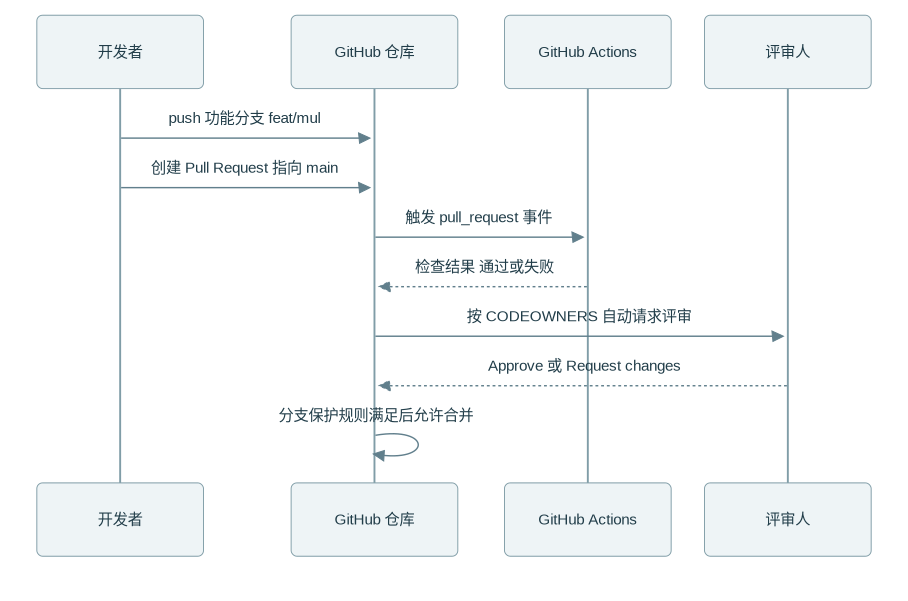
| 功能 | 作用 | 文檔 |
|---|---|---|
| Pull Request | 分支合併前的討論、評審、檢查 | https://docs.github.com/en/pull-requests |
| 三種合併方式 | merge commit / squash / rebase | https://docs.github.com/en/repositories/configuring-branches-and-merges-in-your-repository/configuring-pull-request-merges/about-merge-methods-on-github |
| 分支保護 / 規則集 | 要求評審數、檢查通過、禁止強推 | https://docs.github.com/en/repositories/configuring-branches-and-merges-in-your-repository/managing-rulesets/about-rulesets |
| CODEOWNERS | 按路徑指定程式碼所有者;強制批准需另設保護規則 | https://docs.github.com/en/repositories/managing-your-repositorys-settings-and-features/customizing-your-repository/about-code-owners |
| Actions | 事件驅動的 CI/CD 工作流 | https://docs.github.com/en/actions |
| Secret scanning / Dependabot | 檢測泄露的密鑰、過期依賴 | https://docs.github.com/en/code-security |
以上均為 GitHub 官方文檔。
適用邊界與核驗要點
CODEOWNERS會按規則請求評審,但必須配合分支保護或規則集中的必審要求,才構成合併門禁;草稿PR也有不同的通知行為。一個job的檢出、Python環境和安裝依賴不會自動傳到另一個job。本地裸倉庫只能演示Git傳輸與合併,解析YAML只能說明能讀取結構,不能驗證GitHub事件、權限或工作流可執行性。actions標籤可能移動,示例中的v4/v5是模板引用而非最新版本承諾。
本次檢索核對的主要依據(2026-10-15):
- GitHub:Code owners:自動請求與強制批准是兩項設定。
- GitHub flow:分支、PR、評審與合併協作流程。
可運行示例
平台端PR、評審和Actions未在本例中驗證。本地裸倉庫用於演示Git傳輸與合併;YAML只做本地結構讀取。工作流中的項目檔案路徑需按真實倉庫補齊。
檔案:
# 檔案:examples/github/ci.yml
# .github/workflows/ci.yml —— 本文示例工作流(未在 GitHub 上實跑,僅本地解析)
name: ci
on:
  pull_request:
    branches: [main]
  push:
    branches: [main]
permissions:
  contents: read            # 預設最小權限
jobs:
  test:
    runs-on: ubuntu-latest
    strategy:
      matrix:
        python: ["3.11", "3.12"]
    steps:
      - uses: actions/checkout@v4
      - uses: actions/setup-python@v5
        with:
          python-version: ${{ matrix.python }}
      - run: pip install -r requirements.txt
      - run: python -m pytest -q
  eval:
    needs: test
    runs-on: ubuntu-latest
    steps:
      - uses: actions/checkout@v4
      - uses: actions/setup-python@v5
        with:
          python-version: "3.12"
      - run: pip install -r requirements.txt
      - run: python eval/run_regression.py --threshold 0.85
# 檔案:examples/03_github.sh
#!/usr/bin/env bash
# 在本機模擬 GitHub 的“遠程倉庫 + 功能分支 + Pull Request + 合併”流程(不訪問 github.com)。
set -euo pipefail
export GIT_AUTHOR_NAME=alice GIT_AUTHOR_EMAIL=alice@example.com GIT_COMMITTER_NAME=alice GIT_COMMITTER_EMAIL=alice@example.com
export GIT_AUTHOR_DATE="2026-10-14T10:00:00+08:00" GIT_COMMITTER_DATE="2026-10-14T10:00:00+08:00"
HERE=$(pwd); D=$(mktemp -d); cd "$D"
echo "== ① 一個裸倉庫扮演 GitHub 上的 origin"
git init -q --bare -b main origin.git
git clone -q origin.git alice 2>/dev/null; cd alice
printf 'def add(a, b):\n    return a + b\n' > calc.py; git add .; git commit -q -m "init"; git push -q origin main
echo "== ② Alice 開功能分支、推送(相當於在 GitHub 上開 PR 之前的準備)"
git switch -q -c feat/mul
printf 'def mul(a, b):\n    return a * b\n' >> calc.py; git commit -q -am "feat: 增加乘法"
git push -q -u origin feat/mul 2>&1 | grep -v '^$' || true
git branch -r
echo "== ③ PR 摘要:git request-pull 生成“請把這個分支合進 main”的說明(GitHub PR 頁面展示的就是這些資訊)"
git request-pull main "$D/origin.git" feat/mul | sed "s#$D#<tmp>#"
echo "== ④ 評審透過後以 merge commit 方式合併(GitHub 的 'Create a merge commit' 按鈕)"
git switch -q main
GIT_COMMITTER_DATE="2026-10-14T11:00:00+08:00" git merge -q --no-ff feat/mul -m "Merge pull request #1 from alice/feat/mul"
git push -q origin main; git log --oneline --graph
echo "== ⑤ 本地解析工作流檔案(.github/workflows/ci.yml)"
"${PY:-python3}" - "$HERE/github/ci.yml" <<'PY'
import sys, yaml
wf = yaml.safe_load(open(sys.argv[1]))
on = wf.get(True, wf.get("on"))          # 注意:YAML 1.1 會把鍵 on 解析成布林 True
print("觸發事件:", list(on), " 頂層權限:", wf["permissions"])
for name, job in wf["jobs"].items():
    m = job.get("strategy", {}).get("matrix", {})
    n = 1
    for v in m.values(): n *= len(v)
    print(f"job {name}: needs={job.get('needs')}, 矩陣組合數={n}, 步驟數={len(job['steps'])}")
print("PyYAML 解析出的頂層鍵:", list(wf))
PY
rm -rf "$D"
一稿留存輸出
以下日誌按一稿保留,來自一稿聲稱的原環境;不是本次復跑結果。二稿程式碼改動後可產生不同輸出,實際復跑狀態以本批核驗記錄為準。
== ① 一個裸倉庫扮演 GitHub 上的 origin
== ② Alice 開功能分支、推送(相當於在 GitHub 上開 PR 之前的準備)
  origin/feat/mul
  origin/main
== ③ PR 摘要:git request-pull 生成“請把這個分支合進 main”的說明(GitHub PR 頁面展示的就是這些資訊)
The following changes since commit 5bcd1a1ba272eaefd4bf35f2a8cab8f4fd40bc7f:

  init (2026-10-14 10:00:00 +0800)

are available in the Git repository at:

  <tmp>/origin.git feat/mul

for you to fetch changes up to 23a204e2b64dc2a0135d599ece7c8a163ae39962:

  feat: 增加乘法 (2026-10-14 10:00:00 +0800)

----------------------------------------------------------------
alice (1):
      feat: 增加乘法

 calc.py | 2 ++
 1 file changed, 2 insertions(+)
== ④ 評審透過後以 merge commit 方式合併(GitHub 的 'Create a merge commit' 按鈕)
*   bfbc223 Merge pull request #1 from alice/feat/mul
|\
| * 23a204e feat: 增加乘法
|/
* 5bcd1a1 init
== ⑤ 本地解析工作流檔案(.github/workflows/ci.yml)
觸發事件: ['pull_request', 'push']  頂層權限: {'contents': 'read'}
job test: needs=None, 矩陣組合數=2, 步驟數=4
job eval: needs=test, 矩陣組合數=1, 步驟數=2
PyYAML 解析出的頂層鍵: ['name', True, 'permissions', 'jobs']
- ② 推送後出現
origin/feat/mul,這就是在 GitHub 上能對它“Compare & pull request”的遠程分支。 - ③
git request-pull是 Git 自帶、比 GitHub 早得多的“拉取請求”:說明從哪個提交開始、去哪裏拉、有哪些提交和檔案變化。GitHub 的 PR 把同樣的資訊做成了網頁,並加上了評論與檢查。 - ④
--no-ff生成一個有兩個父提交的合併提交bfbc223,圖中|\與|/就是分叉與匯合;GitHub 的 “Create a merge commit” 產生的就是這種歷史。 - ⑤ 工作流解析出兩個觸發事件、
test任務的矩陣組合數 2(兩個 Python 版本)、eval依賴test。一稿實驗記錄:PyYAML 把頂層鍵on解析成了布林值True(輸出裏頂層鍵列表中的True),因為 YAML 1.1 中on/off/yes/no是布林字面量;GitHub Actions 自己的解析器能正確處理,但你自己寫腳本讀工作流檔案時要留意YAML 1.1 布林類型:https://yaml.org/type/bool.html。
自測
問題: 配置CODEOWNERS後,PR能否在無人批准時合併?
參考答案: 如果沒有啟用要求Code Owner批准的保護規則,仍可能合併。還要檢查規則適用分支、例外權限和是否允許繞過。
常見誤區
- “Fork 和分支是一回事”:分支在同一倉庫內;fork是在平台上創建有關聯的獨立倉庫,用於貢獻與後續同步,適合沒有寫權限的外部貢獻者。
- “私有倉庫就不用擔心密鑰泄露”:協作者、CI 日誌、日後轉公開都可能暴露;GitHub 的 push protection 能在推送時攔截已知格式的密鑰,但不能替代密鑰管理(k6.sec.secret-management)。
- “工作流預設權限很小”:
GITHUB_TOKEN的預設權限取決於組織/倉庫設定;官方建議在工作流裏用permissions:顯式聲明最小權限https://docs.github.com/en/actions/security-for-github-actions/security-guides/automatic-token-authentication。 - “
uses: xxx@v4永遠是同一份程式碼”:標籤可以被移動;安全要求高的場景官方建議固定到完整提交 SHAhttps://docs.github.com/en/actions/security-for-github-actions/security-guides/security-hardening-for-github-actions。
與 AI 開發的關係
- 在 PR 中加入評測迴歸檢查(本例的
eval任務),讓提示詞改動和程式碼改動一樣要“過檢查才能合併”。 - AI 程式碼評審機器人、AI 編程 Agent 通常以 PR 的形式提交改動,人類評審仍是最後一道關。
- 對於常見來自fork的pull_request工作流,倉庫secrets通常不下發;仍需核對事件類型、倉庫設定和例外,這是防止惡意 PR 竊取密鑰的設計;
pull_request_target事件會改變這一點,使用時要格外小心見上方 security hardening 文檔。
延伸閱讀
- GitHub Skills 互動教程:https://skills.github.com/
- GitHub CLI:https://cli.github.com/manual/
尚未驗證的範圍
- 未在GitHub端創建PR或執行Actions;本地Git過程與YAML讀取不能證明平台權限和安全策略生效。
本次示例運行範圍
2026-10-15:未復跑。按所列資料及程式碼審閱修訂;未執行完整示例。未在GitHub端創建PR或執行Actions;本地Git過程與YAML讀取不能證明平台權限和安全策略生效。。
“一稿留存輸出”保留原字,不是二稿程式碼新生成的結果;其原結論須結合二稿修訂與邊界閱讀。