Second-Draft Verification Note (2026-10-15): This article is the second draft of the HeLuoXu tutorial series, revised against official specifications and documentation. Legacy experiment logs are labeled separately as "First-Draft Archived Output" and do not represent a fresh re-run on Windows in this batch; see the batch verification records for current environment details. "Xinghe Notes", accounts, orders, prices, and policies in the examples are fictional teaching data.
One-Line Definition
GitHub is a platform built around Git repositories that provides code hosting, Pull Request reviews, Issues, workflow automation, and access control. Git manages versions locally while GitHub manages collaborative services around repositories; the two can be used independently.
Why It Matters
- Hub for open-source AI projects: PyTorch, transformers, vLLM, llama.cpp, and most major AI libraries are developed on GitHub; reading Issues and PRs is often the fastest way to troubleshoot bugs.
- Pull Requests are the unit of review in modern engineering teams: changes are developed on branches, reviewed (k1.prog.code-review), and checked automatically before merging into the main branch.
- GitHub Actions expresses event-driven testing, evaluation, and deployment as declarative workflows, working alongside project scripts, dependencies, and permission settings (k6.swe.ci-cd).
How It Works / Diagram
Lifecycle of a Pull Request (GitHub Flow) https://docs.github.com/en/get-started/using-github/github-flow
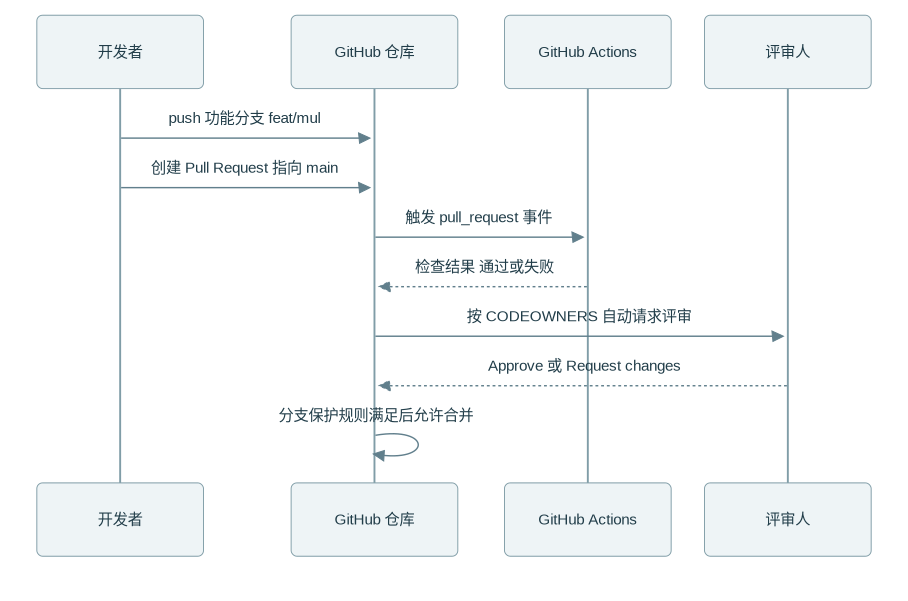
All links above point to official GitHub documentation.
Scope Boundaries & Verification Points
CODEOWNERS automatically requests reviews matching its path rules, but it must be paired with branch protection or ruleset requirements to act as a merge gate; draft PRs also have different notification rules. A checkout, Python environment, and installed dependencies in one job do not carry over automatically to another job. A local bare repository only demonstrates Git transport and merging, and parsing YAML locally only confirms syntactic structure rather than GitHub event triggers, permissions, or workflow execution. Action tags can move over time; v4/v5 in the example are template references rather than a permanent version guarantee.
Primary references verified in this batch (2026-10-15):
- GitHub: Code owners: automatic review requests and required approvals are separate configurations.
- GitHub flow: branch, PR, review, and merge collaboration workflow.
Runnable Example
Hosted GitHub PRs, reviews, and Actions execution are not verified in this local script. A local bare repository is used to demonstrate Git transport and merging, while the workflow YAML is parsed locally for structure inspection. File paths referenced in the workflow must exist in a real repository.
Files:
# File: examples/github/ci.yml
# .github/workflows/ci.yml -- Example workflow (parsed locally, not executed on GitHub)
name: ci
on:
  pull_request:
    branches: [main]
  push:
    branches: [main]
permissions:
  contents: read            # Default least privilege
jobs:
  test:
    runs-on: ubuntu-latest
    strategy:
      matrix:
        python: ["3.11", "3.12"]
    steps:
      - uses: actions/checkout@v4
      - uses: actions/setup-python@v5
        with:
          python-version: ${{ matrix.python }}
      - run: pip install -r requirements.txt
      - run: python -m pytest -q
  eval:
    needs: test
    runs-on: ubuntu-latest
    steps:
      - uses: actions/checkout@v4
      - uses: actions/setup-python@v5
        with:
          python-version: "3.12"
      - run: pip install -r requirements.txt
      - run: python eval/run_regression.py --threshold 0.85
# File: examples/03_github.sh
#!/usr/bin/env bash
# Simulate GitHub's "remote repo + feature branch + Pull Request + merge" workflow locally (without contacting github.com).
set -euo pipefail
export GIT_AUTHOR_NAME=alice GIT_AUTHOR_EMAIL=alice@example.com GIT_COMMITTER_NAME=alice GIT_COMMITTER_EMAIL=alice@example.com
export GIT_AUTHOR_DATE="2026-10-14T10:00:00+08:00" GIT_COMMITTER_DATE="2026-10-14T10:00:00+08:00"
HERE=$(pwd); D=$(mktemp -d); cd "$D"
echo "== 1. A bare repository acts as origin on GitHub"
git init -q --bare -b main origin.git
git clone -q origin.git alice 2>/dev/null; cd alice
printf 'def add(a, b):\n    return a + b\n' > calc.py; git add .; git commit -q -m "init"; git push -q origin main
echo "== 2. Alice creates a feature branch and pushes (preparation before opening a PR on GitHub)"
git switch -q -c feat/mul
printf 'def mul(a, b):\n    return a * b\n' >> calc.py; git commit -q -am "feat: add multiplication"
git push -q -u origin feat/mul 2>&1 | grep -v '^$' || true
git branch -r
echo "== 3. PR summary: git request-pull generates a summary asking to merge this branch into main (what a GitHub PR page displays)"
git request-pull main "$D/origin.git" feat/mul | sed "s#$D#<tmp>#"
echo "== 4. After review approval, merge with a merge commit (GitHub's 'Create a merge commit' button)"
git switch -q main
GIT_COMMITTER_DATE="2026-10-14T11:00:00+08:00" git merge -q --no-ff feat/mul -m "Merge pull request #1 from alice/feat/mul"
git push -q origin main; git log --oneline --graph
echo "== 5. Parse the workflow file locally (.github/workflows/ci.yml)"
"${PY:-python3}" - "$HERE/github/ci.yml" <<'PY'
import sys, yaml
wf = yaml.safe_load(open(sys.argv[1]))
on = wf.get(True, wf.get("on"))          # Note: YAML 1.1 parses the key 'on' as boolean True
print("Trigger events:", list(on), " Top-level permissions:", wf["permissions"])
for name, job in wf["jobs"].items():
    m = job.get("strategy", {}).get("matrix", {})
    n = 1
    for v in m.values(): n *= len(v)
    print(f"job {name}: needs={job.get('needs')}, matrix_combinations={n}, steps={len(job['steps'])}")
print("Top-level keys parsed by PyYAML:", list(wf))
PY
rm -rf "$D"
First-Draft Archived Output
The following log is preserved from the first draft's original environment and is not a re-run from this batch. Code adjustments in the second draft may produce different output; refer to the batch verification record for actual re-run status.
== 1. A bare repository acts as origin on GitHub
== 2. Alice creates a feature branch and pushes (preparation before opening a PR on GitHub)
  origin/feat/mul
  origin/main
== 3. PR summary: git request-pull generates a summary asking to merge this branch into main (what a GitHub PR page displays)
The following changes since commit 5bcd1a1ba272eaefd4bf35f2a8cab8f4fd40bc7f:

  init (2026-10-14 10:00:00 +0800)

are available in the Git repository at:

  <tmp>/origin.git feat/mul

for you to fetch changes up to 23a204e2b64dc2a0135d599ece7c8a163ae39962:

  feat: add multiplication (2026-10-14 10:00:00 +0800)

----------------------------------------------------------------
alice (1):
      feat: add multiplication

 calc.py | 2 ++
 1 file changed, 2 insertions(+)
== 4. After review approval, merge with a merge commit (GitHub's 'Create a merge commit' button)
*   bfbc223 Merge pull request #1 from alice/feat/mul
|\
| * 23a204e feat: add multiplication
|/
* 5bcd1a1 init
== 5. Parse the workflow file locally (.github/workflows/ci.yml)
Trigger events: ['pull_request', 'push']  Top-level permissions: {'contents': 'read'}
job test: needs=None, matrix_combinations=2, steps=4
job eval: needs=test, matrix_combinations=1, steps=2
Top-level keys parsed by PyYAML: ['name', True, 'permissions', 'jobs']
- 2. After pushing,
origin/feat/mulappears — the remote branch for which GitHub offers "Compare & pull request". - 3.
git request-pullis a built-in Git command that predates GitHub: it summarizes the base commit, repository URL, commits, and diffstat. GitHub PRs turn this information into a web interface with comments and status checks. - 4.
--no-ffcreates merge commitbfbc223with two parents;|\and|/in the graph show the branch diverging and rejoining, matching what GitHub's "Create a merge commit" button produces. - 5. The workflow parser finds two trigger events, 2 matrix combinations for
test(two Python versions), andevaldepending ontest. First-draft note: PyYAML parsed the top-level keyonas the boolean valueTrue(seen in the top-level keys list) because YAML 1.1 treatson/off/yes/noas boolean literals. GitHub Actions' own parser handles this properly, but watch out for YAML 1.1 boolean rules when writing custom scripts to inspect workflow files: https://yaml.org/type/bool.html.
Self-Test
Question: After configuring CODEOWNERS, can a PR still be merged if nobody approves it?
Reference Answer: Yes, if branch protection or ruleset settings requiring Code Owner approval are not enabled. You must also check which branches the rule applies to, bypass permissions, and exception policies.
Common Pitfalls
- "A fork and a branch are the same thing": A branch lives inside the same repository; a fork creates a linked, independent copy of the repository on the hosting platform for external contributors who do not have write access to the upstream repo.
- "Secret leaks don't matter in a private repository": Collaborators, CI logs, or making the repository public later can expose secrets. GitHub push protection blocks known secret formats at push time, but it does not replace proper secret management (k6.sec.secret-management).
- "Workflows have minimal permissions by default": Default
GITHUB_TOKENpermissions depend on organization and repository settings; official guidance recommends explicitly declaring least privilege viapermissions:in each workflow (https://docs.github.com/en/actions/security-for-github-actions/security-guides/automatic-token-authentication). - "
uses: xxx@v4always runs the exact same code": Version tags can be moved; for high-security workloads, official guidance recommends pinning third-party actions to a full commit SHA (https://docs.github.com/en/actions/security-for-github-actions/security-guides/security-hardening-for-github-actions).
Connection to AI Development
- Add evaluation regression checks (like the
evaljob in this example) to PRs so prompt edits must pass automated quality gates just like code changes. - AI code review bots and coding Agents typically submit changes via Pull Requests, keeping human review as the final gate.
- For standard
pull_requestworkflows triggered from a fork, repository secrets are withheld by default to prevent malicious PRs from exfiltrating credentials (though you should always verify event types, repo settings, and exceptions); thepull_request_targetevent changes this behavior and must be used with extreme care — see the security hardening guide above.
Further Reading
- GitHub Skills Interactive Courses: https://skills.github.com/
- GitHub CLI Manual: https://cli.github.com/manual/
Unverified Scope
- No PRs or Actions workflows were executed on hosted GitHub; local Git operations and YAML parsing do not verify platform permission enforcement or security policies.
Current Example Execution Scope
2026-10-15: Not Re-run. Revised via documentation and static code review; full example execution was not performed. No PRs or Actions were run on GitHub; local Git commands and YAML parsing do not verify platform permissions or security enforcement.
"First-Draft Archived Output" retains the original log text and is not newly generated by the revised second-draft code; read its conclusions alongside the second-draft revisions and scope boundaries.