Evidence Tiers: [Verified] = Backed by official documentation or trusted primary sources; [Community Consensus] = Broad practitioner experience not formally confirmed by official docs; [Unverified / Speculative] = Hypothesis or not yet verified—treat with caution.
Official documentation: docs.python.org (including the Python Tutorial and Built-in Functions). [Verified]
1. Python's Role When Working with AI Tools
[Community Consensus] Python is the primary language across AI and data workflows: scripts generated by coding agents, ComfyUI (ComfyUI Getting Started: Installation, Nodes, Model Weights, and Your First Image), and most local model utilities are built in Python. Its readable syntax makes it one of the most approachable languages for beginners.
2. Installation and Running Scripts
python3 --version          # Often 'python' or 'py' on Windows
python3 -m venv .venv      # Create a virtual environment (strongly recommended: one per project)
source .venv/bin/activate  # Windows: .venv\Scripts\activate
pip install requests       # Install a third-party package
python3 hello.py
[Community Consensus] Never run sudo pip install to install packages globally into your operating system's Python environment; always use a virtual environment, or tools such as uv or pipx.
3. Syntax Quick Reference
# Variables and basic types
name = "Alice"          # str
age = 30                # int
height = 1.68           # float
is_ok = True            # bool
nothing = None

# Containers
nums = [1, 2, 3]                 # list (mutable)
point = (3, 4)                   # tuple (immutable)
user = {"name": "Bob", "age": 25}  # dict (key-value mapping)
tags = {"ai", "python"}          # set (unique elements)

# Conditionals and loops (indentation defines code blocks!)
if age >= 18:
    print("Adult")
elif age > 12:
    print("Teenager")
else:
    print("Child")

for i, n in enumerate(nums):
    print(i, n)

# Functions
def greet(who: str, times: int = 1) -> str:
    return f"Hello, {who}! " * times

# List comprehension
squares = [n * n for n in nums if n % 2 == 1]

# Exception handling
try:
    value = int("abc")
except ValueError as e:
    print("Conversion failed:", e)

# File I/O ('with' closes the file automatically)
with open("notes.txt", "w", encoding="utf-8") as f:
    f.write("Hello\n")
4. Common Built-in Functions and Standard Library Modules
| Built-in Function | Purpose | Example |
|---|---|---|
print() |
Print output | print("a", 1, sep=",") |
len() |
Length / item count | len(nums) |
type() / isinstance() |
Type inspection | isinstance(x, int) |
int() / float() / str() |
Type conversion | int("42") |
range() |
Integer sequence | range(0, 10, 2) |
enumerate() / zip() |
Indexed iteration / parallel iteration | zip(a, b) |
sorted() / reversed() |
Sorting / reversing | sorted(users, key=lambda u: u["age"]) |
sum() / min() / max() |
Aggregations | max(nums) |
map() / filter() |
Functional transformations | list(map(str, nums)) |
open() |
Open files | See file I/O example above |
input() |
Read user input from stdin | — |
dir() / help() |
Inspect attributes and docstrings | help(str.split) |
| Standard Library Module | Purpose |
|---|---|
os / pathlib |
File paths, directories, and environment variables |
sys |
Command-line arguments (sys.argv) and process exit |
json |
Reading and writing JSON |
re |
Regular expressions |
datetime |
Dates and timestamps |
subprocess |
Running external programs |
collections |
Specialized containers such as Counter and defaultdict |
logging |
Structured application logging |
argparse |
Command-line flag and argument parsing |
5. How to Read a Python Traceback
Traceback (most recent call last):
  File "/home/me/app.py", line 12, in <module>
    main()
  File "/home/me/app.py", line 8, in main
    total = price * qty
            ~~~~~~^~~~~
TypeError: can't multiply sequence by non-int of type 'float'
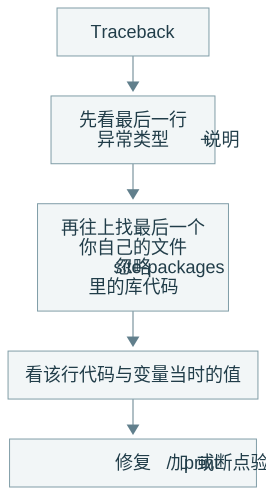
Rule of thumb: Read from the bottom up—the very last line tells you what went wrong, and the lowest frame in your own script tells you where it happened. [Community Consensus]
5.1 Common Exception Reference Table
| Exception | Meaning | Common Cause |
|---|---|---|
SyntaxError |
Invalid Python syntax | Missing colon, unmatched brackets, or full-width punctuation |
IndentationError |
Invalid block indentation | Mixing tabs and spaces or misaligned indentation levels |
NameError: name 'x' is not defined |
Undefined identifier | Typo in variable name or using a variable before assignment |
TypeError |
Incompatible data types | "3" + 4, or passing the wrong number of arguments to a function |
ValueError |
Invalid value for the expected type | int("abc") |
KeyError: 'name' |
Missing dictionary key | Use d.get("name") for safe lookup |
IndexError: list index out of range |
Out-of-bounds sequence index | Off-by-one loop boundary |
AttributeError: 'NoneType' object has no attribute ... |
Calling a method or attribute on None |
An earlier function call returned None unexpectedly |
ModuleNotFoundError: No module named 'xxx' |
Package not installed or wrong virtual environment active | Activate the right virtual environment and run pip install xxx |
FileNotFoundError |
Target file path does not exist | Relative paths are resolved from the current working directory |
UnicodeDecodeError |
Text encoding mismatch | Pass open(..., encoding="utf-8") explicitly |
PermissionError |
Insufficient filesystem permissions | File is locked by another process or lacks write permission |
Source: Built-in Exceptions [Verified]
6. Tips for Collaborating with AI [Community Consensus]
- When asking AI to write a Python script, specify your Python version and state whether it should use "standard library only" or specific third-party packages.
- Always paste the complete Traceback when asking for debugging help.
- If an AI-generated script deletes files or makes network requests, read the code carefully before running it, and run it inside a sandbox whenever appropriate (see related tutorials: DSH Daily Workflow, Profiles, and Advanced Usage, Codex Local Guide: Installation, Permissions, Project Rules, and Troubleshooting, Claude Code Guide: Installation, Permissions, and Project Workflow, ZCode Guide: Connecting Models, Execution Modes, and Target Tasks, Cursor Guide: Project Rules, Execution Modes, and BYOK, Grok Build Guide: Installation, Permissions, Sandbox, and Target Tasks, WorkBuddy Guide: Workspaces, Document Tasks, and Model Settings, OpenClaw Getting Started: Isolated Environments, Configuration, and Safety Boundaries, Qoder Guide: IDE, CLI, Permissions, and Custom Models, QwenWork Guide: Personal Space, Extensions, and Document Delivery).
7. Items Pending Verification & Practical Caveats
- Caret underlines (
~~~^~~~) in tracebacks depend on your Python version (Python 3.11+ provides finer column markers). - The default Python launcher name varies across platforms (
python,python3, orpy).
Hands-On Practice: Step-by-Step Verification
Practice Goal: Create an isolated virtual environment and verify that pip and python point to the exact same interpreter.
The sections above cover concepts, settings, and working examples. The steps below focus on execution order, checkpoints, and output verification during your first hands-on run; refer back to the corresponding section whenever you need exact parameters. Enter commands one at a time and check each result before proceeding.
-
Check which command—
python,python3, orpy—is available on your machine, and stick to that choice consistently throughout the exercise.Additional note: On Windows, test
py --versionorpython --version; on macOS and Linux, testpython3 --version. The command you choose determines which interpreter installation is invoked—do not switch between different launcher names mid-session. -
Create a new project directory, change into it, and create a
.venvvirtual environment. Note that the activation script in Windows PowerShell is.\.venv\Scripts\Activate.ps1, which differs fromcmdand Bash.Additional note: Create the environment with
py -m venv .venvon Windows orpython3 -m venv .venvon POSIX systems, then run the activation script matching your active shell:.venv\Scripts\activate.batincmd, orsource .venv/bin/activatein POSIX Bash. -
If shell activation is blocked, you can invoke the virtual environment's Python binary directly by path—for example,
.\.venv\Scripts\python.exeon Windows.Additional note: On POSIX systems, the direct path is
./.venv/bin/python. Run-c "import sys; print(sys.executable)"with your chosen interpreter to verify that the printed path points inside your project's.venvfolder. -
Save
print("Hello, Python!")ashello.pyand run it with that interpreter to confirm the expected greeting.Additional note: Save the file in UTF-8 encoding with file extensions visible so it does not become
hello.py.txt. Running.\.venv\Scripts\python.exe hello.pyon Windows should printHello, Python!. If you want to try the longer syntax reference block from Section 3, save it separately assyntax_practice.py—note that it prints multiple lines and creates or overwritesnotes.txtin your current folder. -
Install packages using
-m pip installon that exact interpreter rather than relying on a barepipcommand on your PATH.Additional note: For example, run
.\.venv\Scripts\python.exe -m pip install requestson Windows or./.venv/bin/python -m pip install requestson POSIX systems. Verify the install with-c "import requests; print(requests.__version__)"using the same interpreter; note that the basic Hello World script itself does not requirerequests. -
When an exception occurs, copy the full Traceback, read the final exception line first, locate the frame in your own script, and re-test your fix with a small input.
Additional note: In Python, indentation determines block structure. Variables like
d,x, andusersin the quick-reference table are snippet placeholders that must be defined before use. Keep the full Traceback and note which interpreter path you ran so you can separate code bugs from environment mismatches.