
信息层级:【有据可查】= 附官方文档或可信来源链接;【社区共识】= 社区用户普遍经验,未经官方确认;【待考察/推测】= 推测或暂未能核实,请谨慎对待。
官方文档:Microsoft Learn · PowerShell。【有据可查】
1. PowerShell 是什么?与 Bash 有何不同?
【有据可查】PowerShell 是微软的跨平台命令行 shell 与脚本语言;Windows 自带 Windows PowerShell 5.1,跨平台新版为 PowerShell 7.x(命令 pwsh)。来源:PowerShell 版本差异
| Bash | PowerShell | |
|---|---|---|
| 管道里传的是 | 文本 | 对象(带属性的数据) |
| 命令命名 | 简短(ls、grep) |
动词-名词(Get-ChildItem、Select-String) |
| 大小写 | 敏感 | 命令与参数不敏感 |
| 变量 | name=value |
$name = "value" |
2. 常用 Cmdlet(含常见别名)
| Cmdlet | 别名 | 作用 |
|---|---|---|
Get-Location |
pwd |
当前目录 |
Set-Location |
cd |
切换目录 |
Get-ChildItem |
ls、dir |
列出文件(-Recurse 递归,-Force 含隐藏) |
Copy-Item / Move-Item / Remove-Item |
cp / mv / rm |
复制 / 移动 / 删除 |
New-Item -ItemType Directory |
mkdir |
新建目录 |
Get-Content / Set-Content / Add-Content |
cat |
读 / 写 / 追加文件 |
Select-String |
(类似 grep) | 搜索文本 |
Get-Process / Stop-Process |
ps / kill |
进程 |
Invoke-WebRequest / Invoke-RestMethod |
iwr / irm |
HTTP 请求(irm 会自动解析 JSON) |
Get-Command |
gcm |
查找命令 |
Get-Help 命令 -Examples |
help |
查看帮助与示例 |
Get-Member |
gm |
查看对象有哪些属性和方法(PowerShell 学习神器) |
3. 脚本语法速查
# 变量与字符串
$name = "world"
Write-Output "Hello, $name"          # 双引号展开变量;单引号不展开

# 数组与哈希表
$nums = @(1, 2, 3)
$user = @{ Name = "Bob"; Age = 25 }
$user.Name

# 条件(比较运算符是 -eq -ne -gt -lt -ge -le -like -match)
if ($nums.Count -gt 2) {
    "多于两个"
} elseif ($nums.Count -eq 0) {
    "空"
} else {
    "其它"
}

# 循环
foreach ($n in $nums) { "数字 $n" }
$nums | ForEach-Object { $_ * 2 }    # $_ 表示当前管道对象

# 函数
function Get-Greeting {
    param([string]$Who = "you")
    "Hi, $Who"
}
Get-Greeting -Who "Alice"

# 错误处理
try {
    Get-Content "missing.txt" -ErrorAction Stop
} catch {
    Write-Warning "读取失败: $($_.Exception.Message)"
}
⚠️ 最常见的坑:PowerShell 里 >、< 是重定向而不是比较;比较必须用 -gt、-lt。【有据可查:about_Comparison_Operators】
4. 执行策略(为什么脚本"不允许运行")
【有据可查】Windows 上的执行策略(Execution Policy)控制脚本能否运行;它是防止误运行的安全功能,而不是安全边界。来源:about_Execution_Policies
Get-ExecutionPolicy -List
# 只为当前用户放宽到 RemoteSigned(本地脚本可运行,下载的脚本需签名)
Set-ExecutionPolicy -Scope CurrentUser RemoteSigned
【社区共识】不要为了图省事设为 Unrestricted 或 Bypass 作为长期设置;只运行你信任来源的脚本。
5. 读懂报错
Get-Content : Cannot find path 'C:\work\missing.txt' because it does not exist.
At line:1 char:1
+ Get-Content missing.txt
+ ~~~~~~~~~~~~~~~~~~~~~~~
    + CategoryInfo          : ObjectNotFound: (C:\work\missing.txt:String) [Get-Content], ItemNotFoundException
    + FullyQualifiedErrorId : PathNotFound,Microsoft.PowerShell.Commands.GetContentCommand
| 部分 | 含义 |
|---|---|
| 第一行 | 哪个命令 + 人类可读原因 |
At line:1 char:1 |
位置 |
CategoryInfo |
错误类别(ObjectNotFound、PermissionDenied…) |
FullyQualifiedErrorId |
精确错误标识,可搜索 |
PowerShell 7 默认用更简洁的错误视图;
Get-Error可查看最近一次错误的完整详情。【有据可查:Get-Error】
| 报错 | 原因 | 处理 |
|---|---|---|
...cannot be loaded because running scripts is disabled on this system |
执行策略限制 | 见第 4 节 |
The term 'xxx' is not recognized as the name of a cmdlet... |
命令不存在/未安装/不在 PATH | Get-Command xxx 检查 |
Cannot find path ... |
路径错误 | 检查当前目录与引号(路径含空格要加引号) |
Access to the path ... is denied |
权限不足 | 检查文件占用;必要时以管理员运行(慎重) |
Missing closing '}' / Unexpected token |
语法错误 | 检查括号与引号配对 |
A parameter cannot be found that matches parameter name |
参数名错误或版本不支持 | Get-Help 命令 -Full |
| 在 PowerShell 里粘贴 Bash 命令失败 | 语法不同(如 export VAR=1、&& 在 5.1 不支持) |
改写为 $env:VAR = "1" 等 PowerShell 写法 |
6. Bash ↔ PowerShell 对照
| 任务 | Bash | PowerShell |
|---|---|---|
| 设环境变量(当前会话) | export KEY=value |
$env:KEY = "value" |
| 搜索文本 | grep -rn foo . |
Get-ChildItem -Recurse | Select-String foo |
| 查看文件末尾 | tail -f log |
Get-Content log -Wait -Tail 20 |
| 命令是否存在 | which git |
Get-Command git |
| 下载文件 | curl -LO URL |
Invoke-WebRequest URL -OutFile file |
7. 本篇无法核实/需谨慎的点
- Windows PowerShell 5.1 与 PowerShell 7 的细节差异(如
&&支持、默认编码)未全部列出。 - 企业环境中执行策略可能由组策略强制设置。
小白练习:把本文流程逐项走通
练习目标:确认版本,在练习目录读取文件并理解对象管道。
上文已介绍概念、配置和操作示例。下面侧重第一次实际操作时的顺序、检查点和结果核对;需要查具体参数时回到对应小节。命令逐条输入,看到上一条的结果后再继续。
-
从开始菜单打开 PowerShell,运行 $PSVersionTable.PSVersion,确认是 5.1 还是 7.x;先不以管理员身份打开。
补充说明:Windows PowerShell 5.1 与 PowerShell 7.x 的可用语法不同。
%USERPROFILE%、%LOCALAPPDATA%可用于资源管理器地址栏,PowerShell 中相应写为$env:USERPROFILE、$env:LOCALAPPDATA。 -
运行 Get-Location 查看目录,再创建一个练习文件夹,用 Set-Location 切换进去。
补充说明:目录需要存在后才能切换。先查看实际位置,避免把文件操作发到桌面、下载目录或整个个人目录。
-
用编辑器保存 notes.txt,再运行 Get-Content -LiteralPath ./notes.txt,核对读取到的文字。
补充说明:
-LiteralPath按原样解释路径,方括号等不会被当作通配符。用文本编辑器准备练习文件,并核对实际扩展名。 -
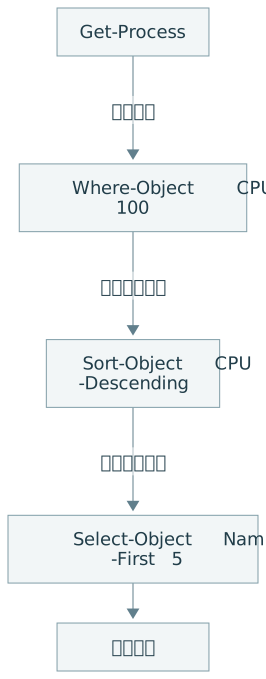
运行 Get-Process,再单独接上 Select-Object Name,Id -First 5,观察对象被筛选成哪几个属性。
补充说明:完整命令为
Get-Process | Select-Object Name,Id -First 5。比较筛选前后输出,理解管道传递的是有Name、Id等属性的对象。 -
保存脚本为 .ps1,并从当前目录用 .\hello.ps1 调用;执行策略受组织管控时遵循管理员规则。
补充说明:首次脚本只写
Write-Output "Hello, PowerShell!",输出应为Hello, PowerShell!。上文完整示例会输出多项内容,并故意读取missing.txt;其-ErrorAction Stop使失败进入catch。 -
命令失败先读错误原因,再检查路径、引号、参数和版本;原生命令的退出码另外看 $LASTEXITCODE。
补充说明:Cmdlet 错误记录与外部程序退出码分开查看,不只凭有没有红字判断成功。表格中的删除文件、停止进程命令用于识别用途,初次练习先完成读取和问候输出。