One-Line Definition
An array organizes elements by numerical index in contiguous memory; CPython's built-in list is a dynamically resized array of object pointers, giving indexed lookup and amortized tail appends while requiring element shifts for insertions or removals near the head.
Why It Matters
- Contiguous arrays are the underlying building block for stacks, binary heaps, and hash-table bucket arrays.
- Understanding contiguous memory layout immediately explains why appending to the end of a list is fast while inserting at index
0is slow—and why unboxed NumPy arrays outperform lists of boxed Python objects (see k1.lib.numpy).
Operating Boundaries
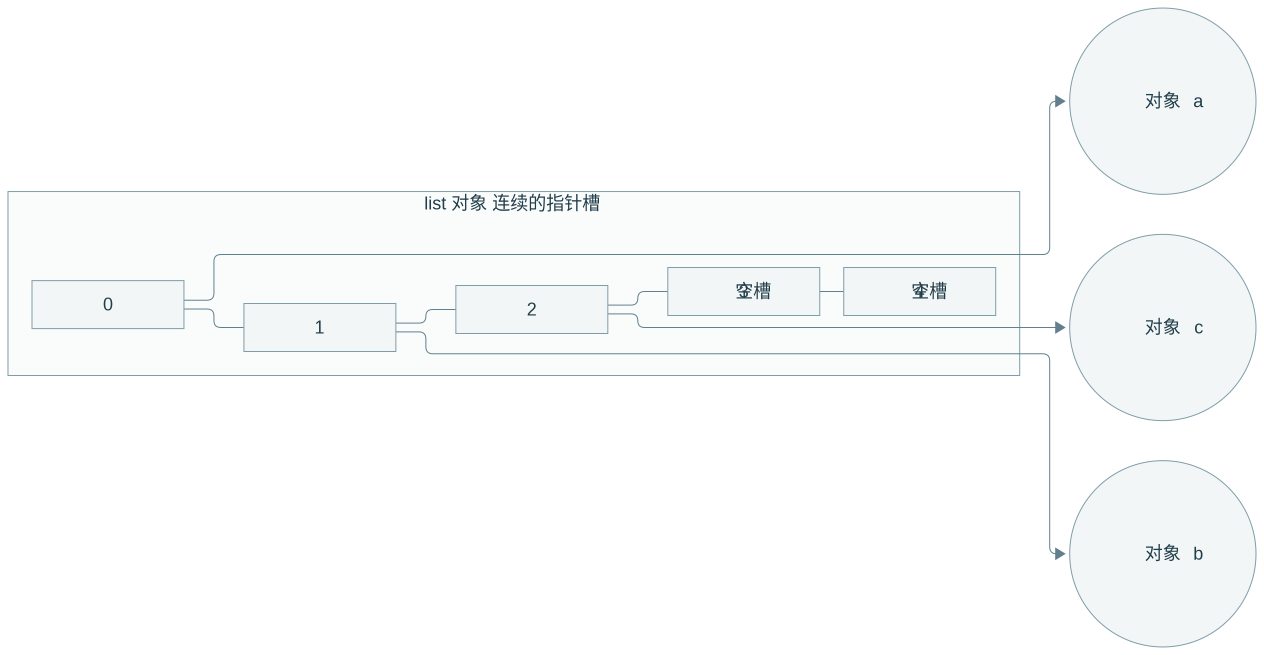
A CPython list stores a contiguous array of 8-byte object references (pointers), not the heap-allocated Python objects themselves. Accordingly, sys.getsizeof(lst) measures only the list header and pointer buffer without recursively summing the referenced elements; likewise, multi-dimensional tensors may be non-contiguous strided views rather than flat contiguous buffers.
How It Works / Diagram
CPython's list is backed by a C pointer array that **over-allocates** capacity proportionally whenever it grows, ensuring that a sequence of append() calls runs in amortized constant time. See the CPython source (https://github.com/python/cpython/blob/main/Objects/listobject.c) and the official Python Wiki time-complexity table (https://wiki.python.org/moin/TimeComplexity).
Direct memory address arithmetic (the reason random access by index is ):
| Operation | Time Complexity | Mechanical Reason |
|---|---|---|
a[i] read / write |
Direct pointer offset calculation | |
append(x) / tail pop() |
Amortized | Writes into spare pre-allocated slot; resizes only occasionally |
insert(0, x) / pop(0) |
Every subsequent pointer slot must shift by one position | |
x in a |
Linear scan comparing elements sequentially |
Runnable Example
Observing capacity step-ups during appends, timing tail vs. head operations, comparing memory footprint against Python's unboxed array.array, and demonstrating the classic 2D list aliasing pitfall (recorded on Python 3.15.0):
# File: examples/08_array.py
# Arrays: contiguous memory + O(1) indexed access; Python's list is a dynamic pointer array
import sys, time, array
from timeit import timeit

lst = []
sizes = []
for i in range(20):
    lst.append(i)
    sizes.append(sys.getsizeof(lst))
print("List byte size steps during append (over-allocation):", sorted(set(sizes)))

big = list(range(1_000_000))
t_idx = timeit(lambda: big[500_000], number=100_000)
t_end = timeit(lambda: big.append(0) or big.pop(), number=100_000)
t_head = timeit(lambda: big.insert(0, 0) or big.pop(0), number=1_000)
print(f"Random access {t_idx/100_000*1e9:.0f} ns | Tail push/pop {t_end/100_000*1e9:.0f} ns | Head insert/pop {t_head/1_000*1e6:.0f} µs")

# Unboxed typed array: array.array stores raw C values without per-element Python object headers
a = array.array("d", range(1000))
print("list of 1000 floats ~", sys.getsizeof(list(map(float, range(1000)))) + 1000 * sys.getsizeof(1.0), "bytes",
      "| array('d') ~", sys.getsizeof(a), "bytes")

# Classic 2D grid trap: [[0]*3]*3 duplicates references to the exact same inner row list
bad = [[0] * 3] * 3; bad[0][0] = 1
good = [[0] * 3 for _ in range(3)]; good[0][0] = 1
print("bad :", bad); print("good:", good)
Recorded output:
List byte size steps during append (over-allocation): [88, 120, 184, 248]
Random access 20 ns | Tail push/pop 42 ns | Head insert/pop 546 µs
list of 1000 floats ~ 32856 bytes | array('d') ~ 8320 bytes
bad : [[1, 0, 0], [1, 0, 0], [1, 0, 0]]
good: [[1, 0, 0], [0, 0, 0], [0, 0, 0]]
sys.getsizeof(lst)climbs in discrete steps (88 → 120 → 184 → 248bytes), proving thatappenddoes not reallocate on every call.- Comparing the nanosecond tail operation against the microsecond head operation on a 1-million-element list illustrates the real-world gap between and .
- Because a Python
liststores 8-byte pointers to 24-byte heapfloatobjects, whereasarray('d')packs raw 8-byte IEEE-754 doubles contiguously, the unboxed array uses roughly one-fourth the memory.
Common Pitfalls
- Initializing a 2D grid with
[[0]*3]*3: Outer repetition copies three references to the exact same inner list object, so mutating one row mutates all three rows simultaneously (see k1.py.object-reference). Always use a list comprehension:[[0]*3 for _ in range(3)]. - Using
list.pop(0)as a FIFO queue: Shifting elements on every dequeue turns an loop into ; usecollections.dequeinstead (see k2.ds.queue). - Assuming a Python
liststores unboxed values: It stores object references, which is why a single list can hold heterogeneous types at the cost of pointer indirection. - Running heavy numerical loops over Python lists: Use vectorized NumPy arrays instead.
Relevance to AI Engineering
- Tensors are multi-dimensional arrays parameterized by shape and strides: In PyTorch and NumPy, a tensor's
shapeandstridemetadata map multi-dimensional indices onto a 1D memory buffer—the exact mechanism behindview(),reshape(), andcontiguous(). - Pre-allocating batch buffers: When sequence lengths or batch sizes are known ahead of time, pre-allocating a fixed tensor or array buffer avoids repeated resize allocations and memory fragmentation.
- Token ID sequences and embedding lookup tables are fundamentally contiguous arrays indexed in time.
Further Reading
- Python Tutorial – More on Lists: https://docs.python.org/zh-cn/3/tutorial/datastructures.html
- Python
arrayStandard Library Module: https://docs.python.org/3/library/array.html - Python Wiki – Time Complexity: https://wiki.python.org/moin/TimeComplexity
Concept Check
If list.append() has an amortized time complexity of , why can a single individual append() call still occasionally take a long time?
Reference answer: Because when the underlying pointer buffer reaches full capacity, that specific append() must allocate a larger buffer and copy all existing pointers over ( worst-case for that single call); amortized describes the average cost per operation spread across a long sequence of appends.
Verification & Reproduction
Verified on: 2026-10-14. Example status: Passed. Execution log: 08_array.py.
Companion Code & Verification Materials