One-Line Definition
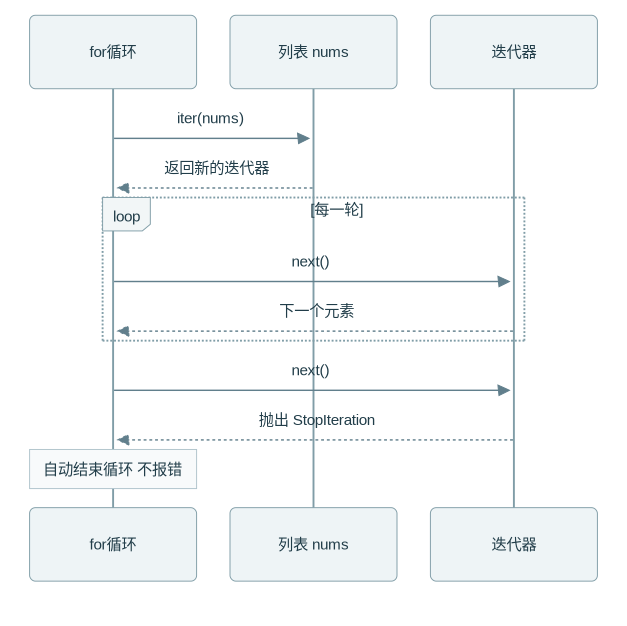
An iterable is any object that can supply an iterator; an iterator maintains the current traversal position, yields elements one at a time via next(), and raises StopIteration when exhausted. Every iterator is also an iterable.
Why It Matters
- Every
forloop in Python runs on this protocol: Lists, dictionaries, open files, database cursors, and PyTorchDataLoaderobjects all implement the iteration protocol. - The foundation of lazy evaluation: Because an iterator computes or loads only one element at a time, it can process streams far larger than system RAM—or even infinite sequences.
- Explains the classic "why is my second pass empty?" bug when a single-pass iterator is accidentally traversed twice.
Operating Boundaries
Being "iterable" does not guarantee that an object can be traversed more than once. In-memory containers like lists create a fresh iterator on each pass, whereas generators, map, and zip objects are consumed in a single pass; file objects can be rewound only via explicit seek() calls. Whether a PyTorch DataLoader reshuffles data on each epoch depends on its sampler or shuffle configuration.
How It Works / Diagram
The iterator protocol: an iterable implements __iter__() to return an iterator; an iterator implements __next__() to return the next item (raising StopIteration when none remain) and implements __iter__() by returning self: https://docs.python.org/3/library/stdtypes.html#iterator-types, https://docs.python.org/3/glossary.html#term-iterator
| Concept | Can Be Traversed Repeatedly? | Examples |
|---|---|---|
| Iterable (container) | Yes; every call to iter() returns a fresh iterator |
list, dict, str, range |
| Iterator | Generally single-pass; file objects require explicit repositioning | iter(list), file objects, map, zip, generators |
Runnable Example
# File: examples/20_iterator.py
# Iterator protocol: __iter__ returns an iterator; __next__ yields items and raises StopIteration when exhausted
class Countdown:
    def __init__(self, start): self.current = start
    def __iter__(self): return self
    def __next__(self):
        if self.current <= 0:
            raise StopIteration
        self.current -= 1
        return self.current + 1

print("Custom iterator:", list(Countdown(3)))

# What a for loop actually does under the hood
it = iter(["a", "b"])
print(next(it), next(it))
try:
    next(it)
except StopIteration:
    print("Exhausted -> StopIteration (caught automatically by a for loop)")

# Iterable vs. iterator: an iterator can only be consumed once
nums = [1, 2, 3]
it = iter(nums)
print("First pass:", list(it), "Second pass:", list(it), "| Container itself is reusable:", list(nums), list(nums))

# itertools: lazy composition
import itertools
print("First 5 odd squares:", list(itertools.islice((n * n for n in itertools.count(1, 2)), 5)))
print("Batched:", list(itertools.batched(range(7), 3)))   # Python 3.12+
Recorded output (Python 3.15.0):
Custom iterator: [3, 2, 1]
a b
Exhausted -> StopIteration (caught automatically by a for loop)
First pass: [1, 2, 3] Second pass: [] | Container itself is reusable: [1, 2, 3] [1, 2, 3]
First 5 odd squares: [1, 9, 25, 49, 81]
Batched: [(0, 1, 2), (3, 4, 5), (6,)]
Notice that itertools.count(1, 2) is an infinite iterator, yet pairing it with itertools.islice(..., 5) computes only the first five values and halts cleanly—demonstrating lazy evaluation in action. itertools.batched has been part of the standard library since Python 3.12: https://docs.python.org/3/library/itertools.html#itertools.batched
Common Pitfalls
- Treating an iterator like a list across two passes: If you write
m = map(f, xs), checklen(list(m)), and then loop withfor x in m:, the loop body never executes becauselist(m)already exhausted the iterator. Materialize a list up front if you need multiple passes. - Mutating a list while iterating over it: Removing items in place shifts indices and skips elements; iterate over a copy or build a new list via a comprehension.
- Writing custom
__next__classes by hand: In almost all cases, a generator function usingyield(see k1.py.generator) is far more concise. - Assuming
rangeis an iterator:rangeis an immutable lazy sequence (an iterable container)—it supports indexing,len(), and repeated iteration.
Relevance to AI Engineering
- PyTorch
DataLoaderis an iterable container: at the start of every training epoch,for batch in loader:callsiter(loader)to spin up a fresh iterator that yields mini-batches according to the configured sampler or shuffle rules: https://docs.pytorch.org/docs/stable/data.html - Streaming large corpora: Passing
streaming=Truein Hugging Facedatasetsreturns anIterableDataset, letting you stream terabyte-scale pre-training corpora record by record without downloading the full dataset to local disk: https://huggingface.co/docs/datasets/stream - Micro-batching API requests: Use
itertools.batched(texts, 64)to chunk large document lists into fixed-size batches before calling an embedding API. - Streaming LLM responses: LLM SDK streaming methods return synchronous or asynchronous iterators, allowing
for chunk in stream:to render generated tokens as soon as they arrive.
Further Reading
- Iterator Types Reference: https://docs.python.org/3/library/stdtypes.html#iterator-types
itertoolsStandard Library Module: https://docs.python.org/3/library/itertools.html- PEP 234 – Iterators: https://peps.python.org/pep-0234/
Concept Check
If you call list(gen) twice in a row on the same generator object gen, why does the second call return an empty list []?
Reference answer: Because the first list(gen) call consumed the generator until it raised StopIteration; to traverse the sequence again, you must either call the generator function again to create a new generator object or store the materialized list from the first pass.
Verification & Reproduction
Verified on: 2026-10-14. Example status: Passed. Execution log: 20_iterator.py.
Companion Code & Verification Materials