One-Line Definition
Software documentation explains how a feature is used, what constraints apply to an interface, and why the design looks the way it does—with tutorials, how-to guides, reference material, and architecture explanations serving distinct reader goals.
Why It Matters
- Source code shows how something executes, not why: Why a particular algorithm was chosen or why a parameter must never be
0belongs in documentation. - Lowers onboarding friction: Clear installation steps, configuration notes, and minimal runnable examples cut down first-run frustration.
- AI coding assistants read documentation too: Tools routinely pull docstrings, type annotations,
READMEfiles, or repository rule files into context (exact discovery rules depend on the tool).
Usage Boundaries
doctest verifies the runnable code examples embedded inside docstrings, not the surrounding prose claims. How AGENTS.md is loaded depends on the specific agent harness, and llms.txt is an emerging index proposal that not every model or client fetches automatically.
How It Works / Diagram
The Diátaxis framework organizes technical documentation into four quadrants around distinct user needs: https://diataxis.fr/
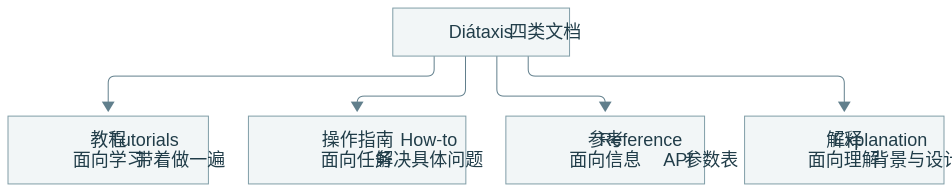
Documentation layers inside a codebase:
| Layer | Artifact | What Belongs Here |
|---|---|---|
| Inline | Comments (#) |
Why the code is written this way (non-obvious constraints or trade-offs) |
| Function / Class | Docstring | What it does, parameters, return value, raised exceptions, and usage examples |
| Module / Package | Module docstring, __init__.py |
What responsibility this module owns |
| Project | README, CHANGELOG, CONTRIBUTING |
How to install, run, and contribute |
| System | Architecture docs, ADRs (Architecture Decision Records) | Key design decisions, alternatives considered, and trade-offs |
For Python docstring conventions, see PEP 257: https://peps.python.org/pep-0257/. Common structured docstring formats include Google style, NumPy style, and reStructuredText.
Runnable Example
A Google-style docstring whose embedded examples double as executable unit tests via doctest, inspected via help() (verified on Python 3.15.0):
# File: examples/11_documentation.py
"""Three layers of code docs: docstring (for callers), inline comment (explaining 'why'), and doctest (executable examples)"""

def chunk(items: list, size: int) -> list[list]:
    """Split a list into fixed-size chunks.

    Args:
        items: The input list to split.
        size: Maximum number of elements per chunk; must be a positive integer.

    Returns:
        A list of sublists, where the final chunk may have fewer than `size` items.

    Raises:
        ValueError: If `size <= 0`.

    Examples:
        >>> chunk([1, 2, 3, 4, 5], 2)
        [[1, 2], [3, 4], [5]]
        >>> chunk([], 3)
        []
    """
    if size <= 0:
        raise ValueError("size must be a positive integer")
    # Slice in steps rather than appending item-by-item: cleaner and faster on large lists (explains 'why', not 'what')
    return [items[i:i + size] for i in range(0, len(items), size)]

if __name__ == "__main__":
    import doctest
    result = doctest.testmod(verbose=False)
    print(f"doctest: attempted {result.attempted} examples, failed {result.failed}")
    help(chunk)
Recorded output:
doctest: attempted 2 examples, failed 0
Help on function chunk in module __main__:

chunk(items: list, size: int) -> list[list]
    Split a list into fixed-size chunks.

    Args:
        items: The input list to split.
        size: Maximum number of elements per chunk; must be a positive integer.

    Returns:
        A list of sublists, where the final chunk may have fewer than `size` items.

    Raises:
        ValueError: If `size <= 0`.

    Examples:
        >>> chunk([1, 2, 3, 4, 5], 2)
        [[1, 2], [3, 4], [5]]
        >>> chunk([], 3)
        []
Why doctest helps: as soon as a documented code snippet drifts out of sync with the implementation, the test suite fails, catching stale examples early. See https://docs.python.org/3/library/doctest.html
Common Misconceptions
- Comments that merely restate the syntax: Writing
x = x + 1 # increment x by 1adds noise. Comments should explain intent, invariants, or non-obvious trade-offs. - Shipping only an API reference with no getting-started guide: An exhaustive parameter table still leaves newcomers guessing where to begin—the exact gap Diátaxis addresses.
- Keeping docs far away from the repository: Standalone wikis go stale fast. Adopting "Docs as Code" keeps documentation in the same Git repo and PR review loop as the code changes.
- Hardcoding version numbers and screenshots in a README without updating them.
Connection to AI Development
- AI rule files are a new class of documentation: Files like
AGENTS.mdand editor rule files tell coding agents about repository conventions, build commands, and off-limits directories. See https://agents.md/ - Drafting docs with AI is fast, but verification is mandatory: Models frequently hallucinate nonexistent flags or overstate edge-case support; running
doctestcatches broken examples automatically. - Source document quality is a major driver of RAG accuracy (alongside retrieval and generation tuning): Poor enterprise Q&A performance often traces back to poorly structured source documents.
Further Reading
- Diátaxis Documentation Framework: https://diataxis.fr/
- PEP 257 — Docstring Conventions: https://peps.python.org/pep-0257/
- Google Python Style Guide — Comments and Docstrings: https://google.github.io/styleguide/pyguide.html#38-comments-and-docstrings
- Sphinx: https://www.sphinx-doc.org/; MkDocs: https://www.mkdocs.org/
Comprehension Check
If the installation steps succeed, but a configuration example references a parameter that does not exist, can the documentation be considered verified?
Reference answer: No. Installation steps, parameter reference tables, and runnable examples must each be verified against the current release.
Verification & Reproduction
Verified on: 2026-10-14. Example status: Passed. Run log: 11_documentation.py.
Companion Code & Verification Materials