Evidence Tiers: [Verified] = Backed by official documentation or trusted primary sources; [Community Consensus] = Broad practitioner experience not formally confirmed by official docs; [Unverified / Speculative] = Hypothesis or not yet verified—treat with caution.
Official documentation: Dev.java Learning Portal, Java SE API Documentation. [Verified]
1. Where Is Java Used?
[Community Consensus] Enterprise backend services (Spring), Android development (alongside Kotlin), big-data processing (the Hadoop/Spark stack), and Minecraft: Java Edition mods. Key traits: strong static typing, cross-platform portability ("write once, run anywhere"), and extensive libraries and tooling.
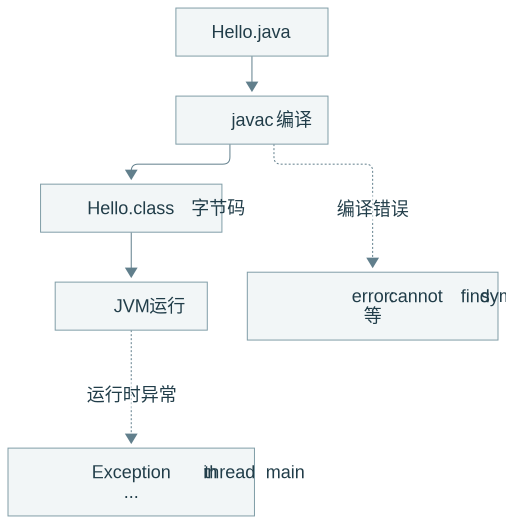
2. Hello World
// Hello.java — filename must match the public class name
import java.util.List;

public class Hello {
    public static void main(String[] args) {
        List<String> names = List.of("Alice", "Bob");
        for (String n : names) {
            System.out.println("Hello, " + n + "!");
        }
    }
}
javac Hello.java && java Hello
# Newer JDKs also support direct single-file source execution: java Hello.java
[Verified] Single-file source-code execution is specified in JEP 330.
3. Syntax Quick Reference
| Topic | Example | Notes |
|---|---|---|
| Primitive types | int, long, double, boolean, char |
Lowercase keywords denote primitive value types |
| Wrapper classes | Integer, Double |
Generic collections require reference/object types |
| Strings | String s = "hi"; s.equals("hi") |
Always compare string contents with equals, never == |
| Local variable type inference | var list = new ArrayList<String>(); |
Java 10+ |
| Classes & objects | class Dog { private String name; Dog(String n){ name = n; } } |
— |
| Interfaces | interface Shape { double area(); } |
— |
| Records | record Point(int x, int y) {} |
Immutable data carrier classes (Java 16+) |
| Lambdas | names.forEach(n -> System.out.println(n)); |
— |
| Streams | nums.stream().filter(n -> n > 2).map(n -> n * 2).toList() |
Declarative collection pipelines |
| Exceptions | try { } catch (IOException e) { } finally { } |
Checked exceptions must be caught or declared with throws |
| Switch expressions | var r = switch (x) { case 1 -> "one"; default -> "other"; }; |
Java 14+ |
4. Common Standard Library Packages
| Package | Common Classes | Purpose |
|---|---|---|
java.lang |
String, Math, Integer.parseInt, System.out |
Imported automatically by default |
java.util |
ArrayList, HashMap, HashSet, List.of, Optional, Scanner |
Collections and general utilities |
java.util.stream |
Stream, Collectors |
Stream processing |
java.nio.file |
Files.readString, Files.writeString, Path.of |
File and path operations |
java.time |
LocalDate, LocalDateTime, Duration |
Dates, times, and durations |
java.net.http |
HttpClient |
HTTP requests (Java 11+) |
java.util.concurrent |
ExecutorService, CompletableFuture |
Concurrency and thread pools |
5. Reading Compiler and Runtime Errors
5.1 Compiler Errors
Hello.java:6: error: cannot find symbol
        Sytem.out.println("hi");
        ^
  symbol:   variable Sytem
  location: class Hello
| Compiler Error | Common Cause |
|---|---|
cannot find symbol |
Typo, missing import statement, or undeclared variable |
incompatible types: String cannot be converted to int |
Type mismatch |
';' expected |
Missing semicolon |
class X is public, should be declared in a file named X.java |
Filename does not match the public class name |
unreported exception IOException; must be caught or declared to be thrown |
Unhandled checked exception |
missing return statement |
A control-flow branch in a non-void method does not return a value |
5.2 Runtime Exception Stack Traces
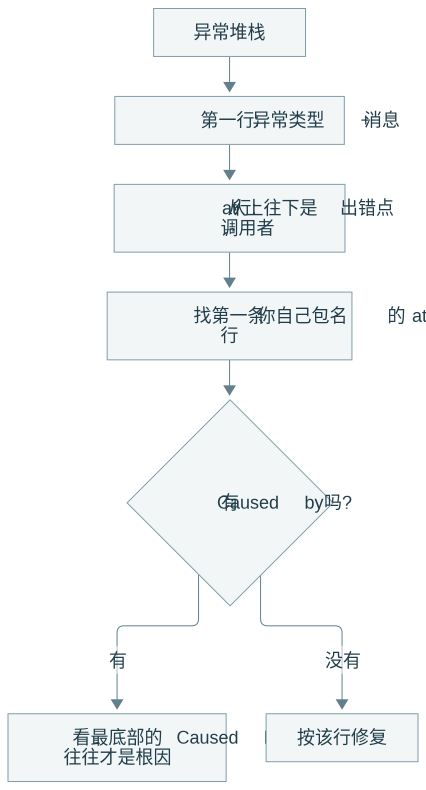
Exception in thread "main" java.lang.NullPointerException: Cannot invoke "String.length()" because "name" is null
    at com.example.App.greet(App.java:15)
    at com.example.App.main(App.java:8)
Caused by: ...
| Exception / Error | Meaning |
|---|---|
NullPointerException |
Calling a method or accessing a field on null; modern JDKs explicitly report which variable was null |
ArrayIndexOutOfBoundsException / IndexOutOfBoundsException |
Array or list index out of bounds |
ClassCastException |
Invalid runtime type cast |
NumberFormatException |
Failed numeric string parsing, e.g. Integer.parseInt("abc") |
ConcurrentModificationException |
Modifying a collection directly while iterating over it |
ClassNotFoundException / NoClassDefFoundError |
Missing class on the classpath or missing dependency jar |
OutOfMemoryError |
JVM heap exhausted or memory leak |
UnsupportedClassVersionError |
Class file compiled with a newer JDK than the JRE/JDK running it |
[Verified] Helpful NullPointerException messages are specified in JEP 358.
6. Build Tools
[Community Consensus] Real-world Java projects use Maven (pom.xml) or Gradle (build.gradle) to manage dependencies and builds. Failed dependency downloads and version conflicts are the most common reasons an AI-generated Java project fails to start—paste the full Maven or Gradle console output when asking AI for help.
7. Items Pending Verification & Practical Caveats
- Language features vary substantially across JDK versions (8 / 11 / 17 / 21 / 25); examples here follow recent LTS releases.
- The Java standard library subset available on Android does not always match desktop/server JDK releases 1:1.
Hands-On Practice: Step-by-Step Verification
Practice Goal: Verify that your JDK works, and distinguish source files, compiled bytecode, and the runtime launch command.
The sections above cover concepts, settings, and working examples. The steps below focus on execution order, checkpoints, and output verification during your first hands-on run; refer back to the corresponding section whenever you need exact parameters. Enter commands one at a time and check each result before proceeding.
-
Install a JDK matching your operating system, then run both
java --versionandjavac --version. If onlyjavaworks, verify your full JDK installation andPATHenvironment variable.Additional note:
javalaunches the JVM runtime, whilejavaccompiles source files into bytecode. TheList.ofcall in our example requires JDK 9+, and newer syntax in the quick-reference table requires the respective JDK versions noted there. -
Create a new folder and save the Section 2 example as
Hello.java; the filename andpublic class Hellomust match in exact letter case.Additional note: Save the complete file in UTF-8 encoding. On Windows, enable visible file extensions to make sure the file is not named
Hello.java.txt, and double-check that the uppercaseHmatches in both places. -
Change your terminal directory to that folder and run
javac Hello.javaby itself. If any compiler error appears, fix the source code and recompile before continuing.Additional note: Once
javacfinishes silently with no errors, check the folder to confirm thatHello.classwas generated. Never run an outdated.classfile after a failed compile. -
After verifying that
Hello.classexists, runjava Hello—pass the class name without the.classfile extension.Additional note: While newer JDKs also support
java Hello.javato compile and run a single source file in memory, runningjavacandjavaas separate steps first helps you see the difference between source code and bytecode. -
Confirm that two greeting lines appear for Alice and Bob. Edit the source file, recompile with
javac Hello.java, and runjava Helloagain so you do not accidentally execute stale bytecode.Additional note: The output should be
Hello, Alice!andHello, Bob!. Heremainis the program entry point,List.ofcreates an immutable list, the enhancedforloop visits each name, andSystem.out.printlnprints each line. -
If you hit a class-version error, compare the JDK used by
javacwith the one used byjava; when diagnosing runtime exceptions, trace both the frames pointing to your own.javafile and any nestedCaused by:sections.Additional note: Classes like
ArrayListin the quick-reference table require correspondingimportstatements, and snippet variables must be declared before use. Always keep your ownat ...lines and allCaused by:chains when sharing a stack trace.