Evidence Tiers: [Verified] = Backed by official documentation or trusted primary sources; [Community Consensus] = Broad practitioner experience not formally confirmed by official docs; [Unverified / Speculative] = Hypothesis or not yet verified—treat with caution.
Authoritative references: cppreference, C++ Core Guidelines. [Verified]
1. Characteristics and Common Use Cases of C++
[Community Consensus] Building on C, C++ adds classes, templates, the Standard Template Library (STL), and RAII resource management. It is widely used in game engines (such as Unreal Engine; see Game Engine Selection Guide: Target Platforms, Learning Curve, and Licensing), high-performance computing, web browsers, and local LLM inference engines (such as llama.cpp).
| Compared with C | What C++ Adds |
|---|---|
Manual malloc/free |
RAII + smart pointers that release memory automatically when leaving scope |
| Raw character arrays | std::string |
| Hand-rolled arrays and linked lists | Containers such as std::vector and std::map |
| Standalone functions | Classes, inheritance, templates, and lambdas |
2. Hello World
#include <iostream>
#include <string>
#include <vector>

int main() {
    std::vector<std::string> names{"Alice", "Bob"};
    for (const auto& n : names) {
        std::cout << "Hello, " << n << "!\n";
    }
    return 0;
}
g++ -std=c++20 -Wall -Wextra -g main.cpp -o main && ./main
3. Modern C++ Syntax Quick Reference
| Topic | Example | Notes |
|---|---|---|
| Automatic type deduction | auto x = 3.14; |
Compiler deduces the type from the initializer |
| References | void f(const std::string& s) |
Avoids copying; const prevents modification |
Range-based for |
for (auto& v : vec) |
Iterates over any standard container |
| Classes | class Dog { public: void bark(); private: int age_; }; |
Encapsulation |
| Constructors / destructors | Dog() {...} / ~Dog() {...} |
Foundation of RAII |
| Smart pointers | auto p = std::make_unique<Dog>(); |
Automatic cleanup; use std::shared_ptr for shared ownership |
| Lambdas | auto add = [](int a, int b){ return a + b; }; |
Inline anonymous functions |
| Templates | template<typename T> T max(T a, T b) |
Generic programming |
| Namespaces | namespace game { ... } |
Prevents symbol name collisions |
| Exceptions | try { ... } catch (const std::exception& e) { ... } |
Structured error handling |
4. Common Standard Library Headers
| Header | Common Symbols | Purpose |
|---|---|---|
<iostream> |
std::cout / std::cin / std::cerr |
Console I/O |
<string> |
std::string, .size(), .substr(), .find(), std::to_string |
Strings |
<vector> |
push_back, emplace_back, size, at (bounds-checked) |
Dynamic arrays |
<map> / <unordered_map> |
insert, find, operator[], contains (C++20) |
Key-value dictionaries |
<algorithm> |
std::sort, std::find, std::count_if, std::max |
Standard algorithms |
<memory> |
std::unique_ptr, std::shared_ptr, std::make_unique |
Memory management |
<optional> |
std::optional<T> |
Values that may or may not be present |
<filesystem> |
std::filesystem::path, exists |
File paths and directory operations |
<chrono> |
Clocks and durations | Timing and performance measurement |
<thread> / <mutex> |
Threads and mutexes | Concurrency |
Source: cppreference C++ Standard Library Headers [Verified]
5. Structure of C++ Diagnostics and How to Pinpoint Errors
[Community Consensus] Template instantiation can turn a tiny type mismatch into dozens or hundreds of lines of compiler output. Key technique: locate the very first error: line, and scan the trace for the line mentioning your own source filename.
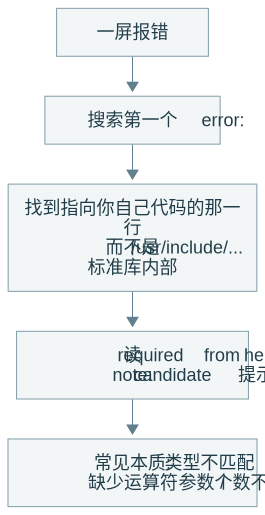
5.1 Common Error Reference Table
| Error Keyword | Common Cause | How to Fix |
|---|---|---|
no matching function for call to ... |
Wrong argument types or count; subsequent note: candidate lines list valid overloads |
Compare your arguments against the listed candidates |
no match for 'operator<<' |
Trying to stream a type that has no output operator defined | Print individual fields or overload operator<< for that type |
'xxx' was not declared in this scope |
Missing header, missing std:: prefix, or typo |
Add the required #include or std:: qualifier |
use of deleted function |
Attempting to copy a move-only object (such as std::unique_ptr) |
Use std::move or pass by reference instead |
undefined reference to 'Foo::bar()' |
Declared in a header but never defined, or the .cpp file was omitted from compilation/linking |
Verify the implementation and your build config (e.g., CMakeLists.txt) |
multiple definition of ... |
Non-inline function or variable defined directly inside a header included by multiple files | Move the definition to a .cpp file or mark it inline |
terminate called after throwing an instance of 'std::out_of_range' |
Runtime out-of-bounds access via .at() |
Check container indices before access |
Segmentation fault |
Dangling pointer/reference or out-of-bounds memory access | Compile with -fsanitize=address |
5.2 Build System Errors
[Community Consensus] Medium-to-large C++ projects typically use CMake. An error like CMake Error: Could not find a package configuration file provided by "XXX" usually means the third-party library is not installed or its path has not been passed to CMake.
6. Tips for Collaborating with AI [Community Consensus]
- Ask AI to write "modern C++" (C++17 / C++20), preferring smart pointers and standard containers over raw
new/delete. - When pasting compiler output, include only the first
error:block with a few surrounding lines plus your own source code rather than flooding the context with pages of template expansion noise. - Unreal Engine C++ relies heavily on engine-specific macros (
UCLASS,UPROPERTY, etc.); always cross-check Unreal build errors against Unreal's official documentation.
7. Items Pending Verification & Practical Caveats
- MSVC error formatting differs substantially from GCC/Clang; examples in this guide use GCC.
- Support for specific C++20 and C++23 features varies by compiler version.
Hands-On Practice: Step-by-Step Verification
Practice Goal: Save and compile a C++ program, and practice identifying the first real error line.
The sections above cover concepts, settings, and working examples. The steps below focus on execution order, checkpoints, and output verification during your first hands-on run; refer back to the corresponding section whenever you need exact parameters. Enter commands one at a time and check each result before proceeding.
-
Run
g++ --versionfirst to confirm a C++ compiler is installed;gccandg++differ in their default compilation and standard library linking behavior.Additional note:
g++handles C++ compilation and automatically links the C++ standard library; check the version output to verify that your compiler supports the-std=c++20flag used in the example. -
Save the example code as
main.cpp, enable file extension display in your file manager, and change your terminal's working directory to that folder.Additional note: Save the full Hello World program in UTF-8 encoding. In Windows "Save as", choose "All Files" and verify that the actual filename is not
main.cpp.txt. -
Run only the compilation portion to the left of
&&first. If anyerrorappears, fix the first error pointing to your own source file instead of running an older binary.Additional note: The standalone compile command is
g++ -std=c++20 -Wall -Wextra -g main.cpp -o main. Here-std=c++20selects the language standard, while the remaining flags enable warnings, include debug symbols, and name the output executable. -
Once compilation succeeds, run the generated binary separately. Use
./mainon Linux/macOS/Bash, or.\main.exefor a native Windows target in Windows PowerShell.Additional note: How you invoke the binary depends on your shell and target platform. Never run a leftover
mainormain.exein the folder when the latest compilation failed. -
Verify that two greeting lines appear in order for Alice and Bob. Modify the list of names, recompile, and check that the output updates accordingly.
Additional note: The full output should be two lines:
Hello, Alice!andHello, Bob!. Herenamesstores the strings, the range-basedforloop visits each element,const auto&binds a read-only reference to the current item, andstd::coutprints it. Try adding"Carol"and recompiling to verify. -
When you encounter a long template error, keep the first
error:line, thenote:lines pointing to your own file, and your compile command so you can trace the root cause systematically.Additional note: Identifiers like
vecandDogin the quick-reference table are snippet placeholders that require surrounding definitions—do not append them line by line into Hello World. Always separate standard-library header frames from your own source file lines when reading diagnostics.