Evidence Tiers: [Verified] = Backed by official documentation or trusted primary sources; [Community Consensus] = Broad practitioner experience not formally confirmed by official docs; [Unverified / Speculative] = Hypothesis or not yet verified—treat with caution.
🎯 Goal: Read and understand AI-generated C code and compiler error messages—not become a C language specialist overnight. Authoritative references: cppreference (C reference), GCC Online Documentation. [Verified]
1. Characteristics and Common Use Cases of C
[Community Consensus] C is a systems programming language close to the hardware: operating system kernels, embedded firmware, databases, and language interpreters (such as CPython) are heavily written in C. Key traits: fast and predictable, with manual memory management.
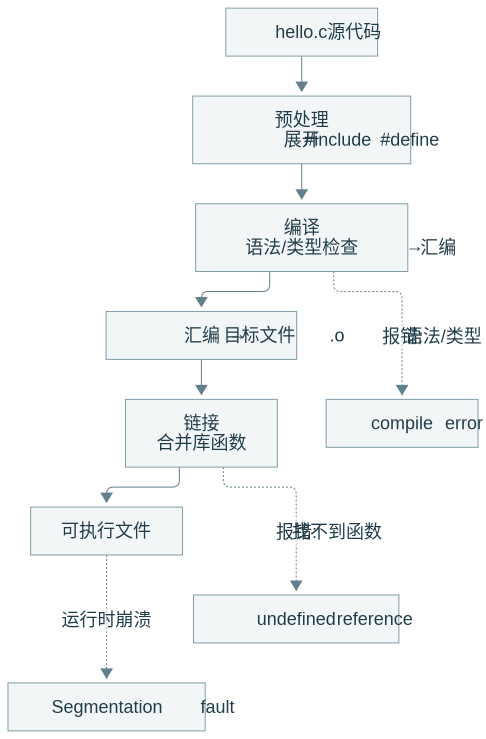
2. Hello World and Compilation
#include <stdio.h>

int main(void) {
    printf("Hello, %s! %d\n", "world", 42);
    return 0;
}
gcc -Wall -Wextra -g hello.c -o hello   # -Wall -Wextra enables common warnings; -g includes debug symbols
./hello
[Community Consensus] Always pass -Wall -Wextra: many bugs can be caught right at the compiler warning stage.
3. Basic Syntax Quick Reference
| Topic | Example | Notes |
|---|---|---|
| Variables & types | int a = 1; double b = 2.5; char c = 'x'; |
Types must be declared explicitly |
| Arrays | int arr[5] = {1,2,3,4,5}; |
0-indexed; no automatic bounds checking |
| Strings | char s[] = "hi"; |
Character array terminated by '\0' |
| Pointers | int *p = &a; *p = 10; |
& takes an address; * dereferences a pointer |
| Conditionals | if (a > 0) {...} else {...} |
0 is false; any non-zero value is true |
| Loops | for (int i = 0; i < n; i++) {...} / while (...) |
— |
| Functions | int add(int x, int y) { return x + y; } |
Must be declared before use |
| Structs | struct Point { int x, y; }; |
Custom composite data type |
| Dynamic memory | int *p = malloc(n * sizeof *p); ... free(p); |
Every allocation must be freed when no longer needed |
| Macros | #define MAX 100 |
Text substitution during preprocessing |
4. Common Standard Library Functions
| Header | Functions | Purpose | Caution |
|---|---|---|---|
<stdio.h> |
printf / fprintf / snprintf |
Formatted output | Format specifiers must match argument types (%d int, %f double, %s string, %zu size_t) |
<stdio.h> |
scanf / fgets |
Input | Prefer fgets when reading strings to prevent buffer overflow |
<stdio.h> |
fopen / fclose / fread / fwrite |
File I/O | Always check whether fopen returns NULL |
<stdlib.h> |
malloc / calloc / realloc / free |
Dynamic memory | Check return values for NULL; never double-free |
<stdlib.h> |
atoi / strtol / exit / qsort |
Conversion, process exit, sorting | strtol reports conversion errors and is safer than atoi |
<string.h> |
strlen / strcmp / strcpy / strncpy / memcpy / memset |
Strings and raw memory | strcpy does not check destination buffer length and easily overflows |
<math.h> |
sqrt / pow / fabs |
Math functions | May require linking with -lm |
<errno.h> + <string.h> |
errno / strerror(errno) |
Inspect system error codes | perror("fopen") is a convenient shorthand |
Source: cppreference C Standard Library Headers [Verified]
5. Reading Compiler and Runtime Errors
5.1 Anatomy of a Compiler Error
main.c:7:5: error: 'conut' undeclared (first use in this function); did you mean 'count'?
  7 |     conut++;
    |     ^~~~~
| Component | Meaning |
|---|---|
main.c:7:5 |
File : Line : Column |
error / warning |
Errors block compilation; warnings strongly merit fixing |
| Message text | Explanation of the issue, often with a did you mean suggestion |
^~~~ |
Caret pointing to the offending token |
Rule of thumb: Always fix the very first error first—subsequent errors are often cascading fallout from the first one. [Community Consensus]
5.2 Common Error Reference Table
| Error Message | Stage | Common Cause | How to Fix |
|---|---|---|---|
expected ';' before ... |
Compile | Missing semicolon on the previous statement | Check the line right above the reported line |
'x' undeclared |
Compile | Typo, undeclared variable, or out of scope | Check spelling and where the variable is declared |
implicit declaration of function 'foo' |
Compile (warning/error) | Missing #include header or function prototype |
Add the appropriate header or forward declaration |
incompatible types / makes pointer from integer |
Compile | Mixing up pointers and integer values | Check your use of & and * |
format '%d' expects argument of type 'int' |
Compile warning | Mismatched printf format specifier |
Use the matching format specifier |
undefined reference to 'sqrt' |
Link | Library not linked | Pass -lm or the required library flag |
undefined reference to 'main' |
Link | Missing main function or source file omitted from the command |
Check your compiler invocation |
Segmentation fault (core dumped) |
Runtime | Null pointer dereference, out-of-bounds access, or use-after-free | Debug with gdb or compile with -fsanitize=address |
double free or corruption |
Runtime | Freeing the same pointer twice or heap corruption | Use AddressSanitizer |
stack smashing detected |
Runtime | Out-of-bounds write to a stack-allocated array | Check array indices and string copy lengths |
5.3 Pinpointing Runtime Crashes
gcc -g -fsanitize=address,undefined main.c -o main && ./main
[Verified: GCC Instrumentation Options] AddressSanitizer prints the exact line number and memory access trace when an invalid memory operation occurs.
6. Tips for Collaborating with AI [Community Consensus]
- Send the complete error output + compiler command + relevant source code to the AI instead of just saying "it failed to compile."
- When asking AI to write C code, explicitly prompt: "Check all
mallocreturn values, ensure every allocation is paired withfree, and verify all array bounds." - Carefully audit buffer lengths in any string-handling code generated by AI.
7. Items Pending Verification & Practical Caveats
- Diagnostic phrasing varies across compilers (GCC, Clang, MSVC); examples in this guide use GCC.
- Differences across C language standards (C11 / C17 / C23) are not covered in detail here.
Hands-On Practice: Step-by-Step Verification
Practice Goal: Save Hello World to a source file, then compile and run it as two distinct steps.
The sections above cover concepts, settings, and working examples. The steps below focus on execution order, checkpoints, and output verification during your first hands-on run; refer back to the corresponding section whenever you need exact parameters. Enter commands one at a time and check each result before proceeding.
-
Install a C compiler following the official GCC documentation or your operating system's toolchain guide, then run
gcc --version; installing a text editor alone does not install a compiler.Additional note: The version check should print GCC version details. If the command is not found, set up your compiler toolchain for your OS first—an editor by itself cannot turn source code into an executable.
-
Create a new practice folder and save the Hello World example above as
hello.cin your editor. Turn on file extension display in your file manager to make sure it is not namedhello.c.txt.Additional note: Save the complete C example in UTF-8 encoding using a plain-text editor. In Windows "Save as", select "All Files" and verify that the filename did not become
hello.c.txt. -
Open a terminal, use
cdto change into the directory containinghello.c, and list the directory contents to confirm the file is there.Additional note:
hello.cis the input source file,-o hellosets the output binary name,-Wall -Wextraenables common warnings, and-gadds debug symbols. If compilation fails with an error, fix the code first rather than running a leftover binary from an earlier build. -
Run the
gcccompilation command by itself. Once it finishes with zero errors, verify that the executable file was generated before running it.Additional note: Make sure your terminal environment matches your compiler target. Native Windows GCC toolchains typically produce
hello.exe, which you run in PowerShell as.\hello.exe; in Bash environments, run./helloas shown above. -
Use
./helloin Bash, or.\hello.exefor a native Windows executable in Windows PowerShell. Confirm your compilation target first and avoid mixing the two environments.Additional note: The full output should be
Hello, world! 42. Here%sformats the stringworld,%dformats the integer42,\nadds a trailing newline, andreturn 0signals normal program termination. -
Confirm that you see
Hello, world! 42. Change the number in the source file, recompile, and run again—running the old executable without recompiling will not pick up source changes automatically.Additional note: Change
42to7, save the file, recompile, and run again to verify the updated output. Variables likenandain the syntax cheat sheet are standalone snippets that require surrounding definitions—do not paste the cheat-sheet rows together as a single file.